Advanced Multi-Mode Touch Lamp
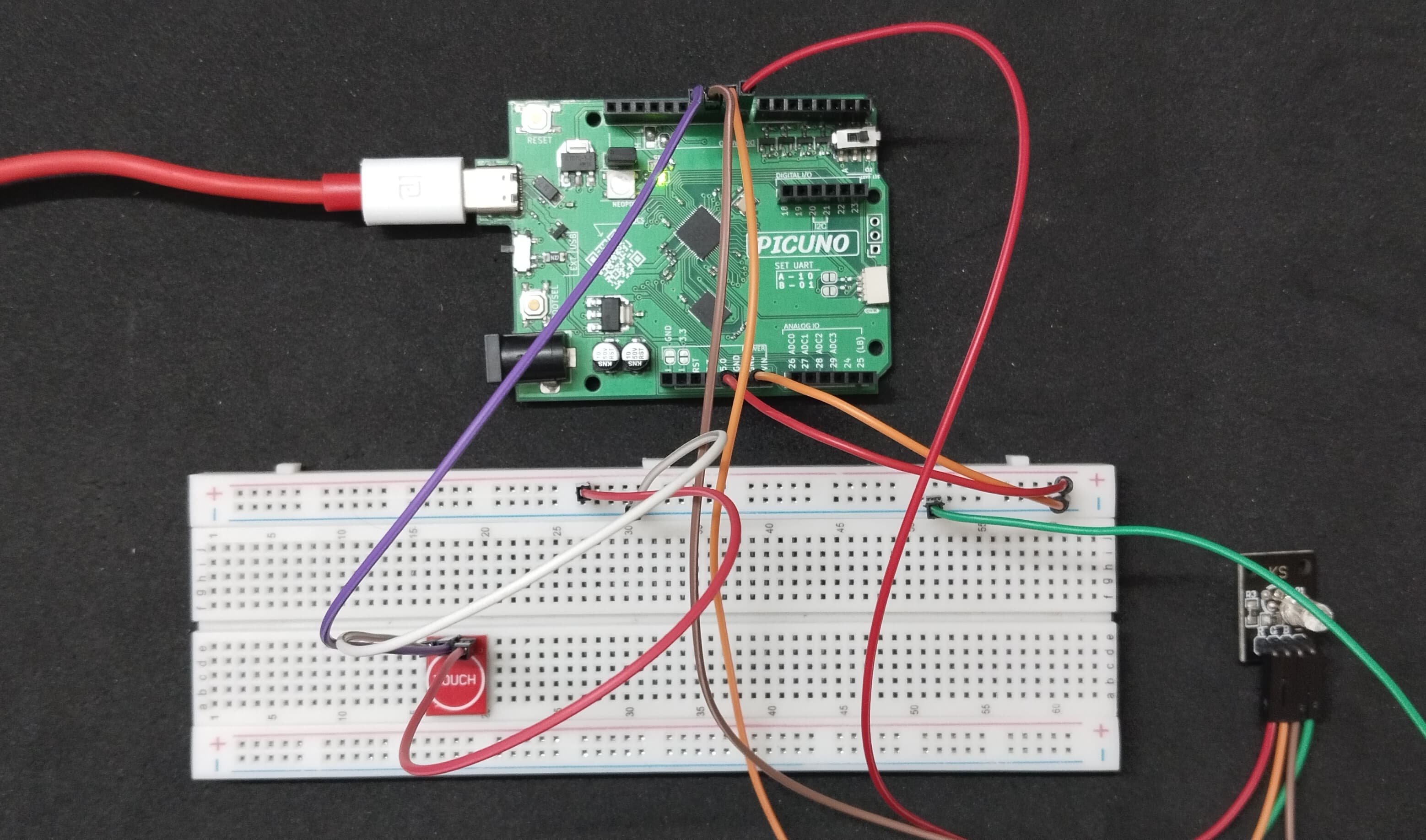
HARDWARE REQUIRED:
- PICUNO Microcontroller board
- 1 × Capacitive Touch Sensor module
- 1 × Common Cathode RGB LED
- Jumper wires
- USB cable
DESCRIPTION:
This project creates a sophisticated smart lamp controlled by a single capacitive touch sensor with multiple gesture inputs. The lamp's RGB LED can display static colours, a smooth rainbow cycle, and a fading "breathing" effect. A short tap cycles through the available effects (Static Red → Green → Blue → Rainbow → back to Red). A long touch toggles the breathing/fade animation on or off for the current colour or effect. A quick double-tap is the exclusive way to turn the lamp off, preventing accidental shutoff.
CIRCUIT DIAGRAM:

- Touch Sensor Module:
- Connect negative terminal to GND on PICUNO.
- Connect positive terminal to 5V.
- Connect the Signal Pin (S) to GPIO 11.
- RGB LED COMMON CATHODE:
- Connect the cathode to GND.
- Connect the RED leg to GPIO 8.
- Connect the GREEN leg to GPIO 9.
- Connect the BLUE leg to GPIO 10.
SCHEMATIC:
Touch Sensor VCC → 5V
Touch Sensor GND → GND
Touch Sensor SIG → GPIO 11
RGB LED Red Pin → GPIO 8
RGB LED Green Pin → GPIO 9
RGB LED Blue Pin → GPIO 10
RGB LED Common Cathode → GND
CODE -- C:
#include <Arduino.h>
const int RED_PIN = 8;
const int GREEN_PIN = 9;
const int BLUE_PIN = 10;
const int TOUCH_PIN = 11;
int mode = 1; // 0=OFF, 1=STATIC, 2=BREATHING
int colorIndex = 0; // 0=Red, 1=Green, 2=Blue, 3=Rainbow
byte colors[3][3] = { {255,0,0}, {0,255,0}, {0,0,255} };
bool lastTouchState = LOW;
unsigned long pressTime = 0;
unsigned long releaseTime = 0;
bool doubleTapHandled = false;
void setup() {
pinMode(RED_PIN, OUTPUT);
pinMode(GREEN_PIN, OUTPUT);
pinMode(BLUE_PIN, OUTPUT);
pinMode(TOUCH_PIN, INPUT);
setColor(colors[0][0], colors[0][1], colors[0][2]);
}
// Function to set a static color
void setColor(byte r, byte g, byte b) {
analogWrite(RED_PIN, r);
analogWrite(GREEN_PIN, g);
analogWrite(BLUE_PIN, b);
}
// Function to convert HSV (Hue) to RGB for the rainbow effect
void hsvToRgb(float h, float s, float v, byte& r, byte& g, byte& b) {
int i = floor(h * 6); float f = h * 6 - i;
float p = v * (1 - s); float q = v * (1 - f * s); float t = v * (1 - (1 - f) * s);
i %= 6;
if (i == 0) { r = v*255; g = t*255; b = p*255; } if (i == 1) { r = q*255; g = v*255; b = p*255; }
if (i == 2) { r = p*255; g = v*255; b = t*255; } if (i == 3) { r = p*255; g = q*255; b = v*255; }
if (i == 4) { r = t*255; g = p*255; b = v*255; } if (i == 5) { r = v*255; g = p*255; b = q*255; }
}
void loop() {
bool currentTouchState = digitalRead(TOUCH_PIN);
// --- Touch Detection Logic ---
if (currentTouchState == HIGH && lastTouchState == LOW) { // Just Pressed
if (millis() - releaseTime < 250) {
mode = 0; // Turn OFF
doubleTapHandled = true;
}
pressTime = millis();
}
else if (currentTouchState == LOW && lastTouchState == HIGH) { // Just Released
if (doubleTapHandled) {
doubleTapHandled = false;
} else {
unsigned long pressDuration = millis() - pressTime;
if (pressDuration > 800) { // Long Press -> Toggle Breathing
if (mode == 1) mode = 2;
else if (mode == 2) mode = 1;
} else { // Short Tap
if (mode == 0) {
mode = 1; colorIndex = 0;
} else {
mode = 1;
colorIndex = (colorIndex + 1) % 4;
}
}
}
releaseTime = millis();
}
lastTouchState = currentTouchState;
// --- LED Control Logic ---
if (mode == 0) { // OFF
setColor(0, 0, 0);
} else if (mode == 1) { // STATIC / RAINBOW
if (colorIndex < 3) { // Red, Green, or Blue
setColor(colors[colorIndex][0], colors[colorIndex][1], colors[colorIndex][2]);
} else { // RAINBOW CYCLE
float hue = (millis() % 5000) / 5000.0;
byte r, g, b;
hsvToRgb(hue, 1.0, 1.0, r, g, b);
setColor(r, g, b);
}
} else if (mode == 2) { // BREATHING
float brightness = (sin(millis() / 2000.0 * 2 * PI) + 1) / 2.0;
byte r, g, b;
if (colorIndex < 3) {
r = colors[colorIndex][0] * brightness;
g = colors[colorIndex][1] * brightness;
b = colors[colorIndex][2] * brightness;
} else { // Breathing Rainbow
float hue = (millis() % 5000) / 5000.0;
hsvToRgb(hue, 1.0, brightness, r, g, b);
}
setColor(r, g, b);
}
delay(10);
}
const int RED_PIN = 8;
const int GREEN_PIN = 9;
const int BLUE_PIN = 10;
const int TOUCH_PIN = 11;
int mode = 1; // 0=OFF, 1=STATIC, 2=BREATHING
int colorIndex = 0; // 0=Red, 1=Green, 2=Blue, 3=Rainbow
byte colors[3][3] = { {255,0,0}, {0,255,0}, {0,0,255} };
bool lastTouchState = LOW;
unsigned long pressTime = 0;
unsigned long releaseTime = 0;
bool doubleTapHandled = false;
void setup() {
pinMode(RED_PIN, OUTPUT);
pinMode(GREEN_PIN, OUTPUT);
pinMode(BLUE_PIN, OUTPUT);
pinMode(TOUCH_PIN, INPUT);
setColor(colors[0][0], colors[0][1], colors[0][2]);
}
// Function to set a static color
void setColor(byte r, byte g, byte b) {
analogWrite(RED_PIN, r);
analogWrite(GREEN_PIN, g);
analogWrite(BLUE_PIN, b);
}
// Function to convert HSV (Hue) to RGB for the rainbow effect
void hsvToRgb(float h, float s, float v, byte& r, byte& g, byte& b) {
int i = floor(h * 6); float f = h * 6 - i;
float p = v * (1 - s); float q = v * (1 - f * s); float t = v * (1 - (1 - f) * s);
i %= 6;
if (i == 0) { r = v*255; g = t*255; b = p*255; } if (i == 1) { r = q*255; g = v*255; b = p*255; }
if (i == 2) { r = p*255; g = v*255; b = t*255; } if (i == 3) { r = p*255; g = q*255; b = v*255; }
if (i == 4) { r = t*255; g = p*255; b = v*255; } if (i == 5) { r = v*255; g = p*255; b = q*255; }
}
void loop() {
bool currentTouchState = digitalRead(TOUCH_PIN);
// --- Touch Detection Logic ---
if (currentTouchState == HIGH && lastTouchState == LOW) { // Just Pressed
if (millis() - releaseTime < 250) {
mode = 0; // Turn OFF
doubleTapHandled = true;
}
pressTime = millis();
}
else if (currentTouchState == LOW && lastTouchState == HIGH) { // Just Released
if (doubleTapHandled) {
doubleTapHandled = false;
} else {
unsigned long pressDuration = millis() - pressTime;
if (pressDuration > 800) { // Long Press -> Toggle Breathing
if (mode == 1) mode = 2;
else if (mode == 2) mode = 1;
} else { // Short Tap
if (mode == 0) {
mode = 1; colorIndex = 0;
} else {
mode = 1;
colorIndex = (colorIndex + 1) % 4;
}
}
}
releaseTime = millis();
}
lastTouchState = currentTouchState;
// --- LED Control Logic ---
if (mode == 0) { // OFF
setColor(0, 0, 0);
} else if (mode == 1) { // STATIC / RAINBOW
if (colorIndex < 3) { // Red, Green, or Blue
setColor(colors[colorIndex][0], colors[colorIndex][1], colors[colorIndex][2]);
} else { // RAINBOW CYCLE
float hue = (millis() % 5000) / 5000.0;
byte r, g, b;
hsvToRgb(hue, 1.0, 1.0, r, g, b);
setColor(r, g, b);
}
} else if (mode == 2) { // BREATHING
float brightness = (sin(millis() / 2000.0 * 2 * PI) + 1) / 2.0;
byte r, g, b;
if (colorIndex < 3) {
r = colors[colorIndex][0] * brightness;
g = colors[colorIndex][1] * brightness;
b = colors[colorIndex][2] * brightness;
} else { // Breathing Rainbow
float hue = (millis() % 5000) / 5000.0;
hsvToRgb(hue, 1.0, brightness, r, g, b);
}
setColor(r, g, b);
}
delay(10);
}
State Variables - The code uses mode (OFF, STATIC, BREATHING) and colorIndex (Red, Green, Blue, Rainbow) to keep track of what the lamp should be doing.
Touch Logic - The code detects the difference between a short tap, a long press, and a double tap by measuring time. pressDuration checks how long the sensor was held, while millis() - releaseTime checks how quickly a new tap occurred after the last one.
Rainbow Effect - The hsvToRgb function converts a "Hue" value (which represents a colour on a wheel) to the RGB values the LED can understand. By slowly increasing the hue over time, it creates a smooth rainbow cycle.
Breathing Effect - The sin() math function generates a smooth wave, which is used to gradually increase and decrease the LED's brightness, creating a pulsing effect.
Touch Logic - The code detects the difference between a short tap, a long press, and a double tap by measuring time. pressDuration checks how long the sensor was held, while millis() - releaseTime checks how quickly a new tap occurred after the last one.
Rainbow Effect - The hsvToRgb function converts a "Hue" value (which represents a colour on a wheel) to the RGB values the LED can understand. By slowly increasing the hue over time, it creates a smooth rainbow cycle.
Breathing Effect - The sin() math function generates a smooth wave, which is used to gradually increase and decrease the LED's brightness, creating a pulsing effect.
CODE -- PYTHON:
from machine import Pin, PWM
from time import sleep_ms, ticks_ms, ticks_diff
import math
red = PWM(Pin(8)); green = PWM(Pin(9)); blue = PWM(Pin(10))
red.freq(1000); green.freq(1000); blue.freq(1000)
touch = Pin(11, Pin.IN)
mode = 1; color_index = 0
colors = [(65535,0,0), (0,65535,0), (0,0,65535)]
last_touch_state = 0; press_time = 0; release_time = 0; double_tap_handled = False
def set_color(r, g, b):
red.duty_u16(int(r)); green.duty_u16(int(g)); blue.duty_u16(int(b))
def hsv_to_rgb(h, s, v):
if s == 0.0: return v, v, v
i = int(h*6.0); f = (h*6.0) - i; p = v*(1.0-s); q = v*(1.0-s*f); t = v*(1.0-s*(1.0-f)); i = i%6
if i == 0: return v, t, p;
if i == 1: return q, v, p;
if i == 2: return p, v, t;
if i == 3: return p, q, v;
if i == 4: return t, p, v;
if i == 5: return v, p, q;
set_color(colors[0][0], colors[0][1], colors[0][2]) # Start with Red
while True:
current_touch_state = touch.value()
# --- Touch Detection Logic ---
if current_touch_state == 1 and last_touch_state == 0: # Pressed
if ticks_diff(ticks_ms(), release_time) < 250:
mode = 0; double_tap_handled = True
press_time = ticks_ms()
elif current_touch_state == 0 and last_touch_state == 1: # Released
if double_tap_handled:
double_tap_handled = False
else:
press_duration = ticks_diff(ticks_ms(), press_time)
if press_duration > 800: # Long Press
if mode == 1: mode = 2
elif mode == 2: mode = 1
else: # Short Tap
if mode == 0: mode = 1; color_index = 0
else: mode = 1; color_index = (color_index + 1) % 4
release_time = ticks_ms()
last_touch_state = current_touch_state
# --- LED Control Logic ---
if mode == 0: set_color(0,0,0)
elif mode == 1:
if color_index < 3: r,g,b = colors[color_index]; set_color(r,g,b)
else: hue = (ticks_ms()%5000)/5000; r,g,b = hsv_to_rgb(hue,1,1); set_color(r*65535,g*65535,b*65535)
elif mode == 2:
brightness = (math.sin(ticks_ms()/2000*2*math.pi)+1)/2
if color_index < 3: r,g,b = colors[color_index]; set_color(r*brightness,g*brightness,b*brightness)
else: hue = (ticks_ms()%5000)/5000; r,g,b = hsv_to_rgb(hue,1,brightness); set_color(r*65535,g*65535,b*65535)
sleep_ms(20)
from time import sleep_ms, ticks_ms, ticks_diff
import math
red = PWM(Pin(8)); green = PWM(Pin(9)); blue = PWM(Pin(10))
red.freq(1000); green.freq(1000); blue.freq(1000)
touch = Pin(11, Pin.IN)
mode = 1; color_index = 0
colors = [(65535,0,0), (0,65535,0), (0,0,65535)]
last_touch_state = 0; press_time = 0; release_time = 0; double_tap_handled = False
def set_color(r, g, b):
red.duty_u16(int(r)); green.duty_u16(int(g)); blue.duty_u16(int(b))
def hsv_to_rgb(h, s, v):
if s == 0.0: return v, v, v
i = int(h*6.0); f = (h*6.0) - i; p = v*(1.0-s); q = v*(1.0-s*f); t = v*(1.0-s*(1.0-f)); i = i%6
if i == 0: return v, t, p;
if i == 1: return q, v, p;
if i == 2: return p, v, t;
if i == 3: return p, q, v;
if i == 4: return t, p, v;
if i == 5: return v, p, q;
set_color(colors[0][0], colors[0][1], colors[0][2]) # Start with Red
while True:
current_touch_state = touch.value()
# --- Touch Detection Logic ---
if current_touch_state == 1 and last_touch_state == 0: # Pressed
if ticks_diff(ticks_ms(), release_time) < 250:
mode = 0; double_tap_handled = True
press_time = ticks_ms()
elif current_touch_state == 0 and last_touch_state == 1: # Released
if double_tap_handled:
double_tap_handled = False
else:
press_duration = ticks_diff(ticks_ms(), press_time)
if press_duration > 800: # Long Press
if mode == 1: mode = 2
elif mode == 2: mode = 1
else: # Short Tap
if mode == 0: mode = 1; color_index = 0
else: mode = 1; color_index = (color_index + 1) % 4
release_time = ticks_ms()
last_touch_state = current_touch_state
# --- LED Control Logic ---
if mode == 0: set_color(0,0,0)
elif mode == 1:
if color_index < 3: r,g,b = colors[color_index]; set_color(r,g,b)
else: hue = (ticks_ms()%5000)/5000; r,g,b = hsv_to_rgb(hue,1,1); set_color(r*65535,g*65535,b*65535)
elif mode == 2:
brightness = (math.sin(ticks_ms()/2000*2*math.pi)+1)/2
if color_index < 3: r,g,b = colors[color_index]; set_color(r*brightness,g*brightness,b*brightness)
else: hue = (ticks_ms()%5000)/5000; r,g,b = hsv_to_rgb(hue,1,brightness); set_color(r*65535,g*65535,b*65535)
sleep_ms(20)
State Variables - mode and color_index track what the lamp should be doing.
Touch Logic - The code uses ticks_ms() and ticks_diff() to measure time. It can tell the difference between a short tap, a long press (>800ms), and a double tap (<250ms between taps).
Rainbow Effect - The hsv_to_rgb function converts a continuously changing 'Hue' value into RGB colors for the LED.
Breathing Effect - The math.sin() function creates a smooth wave used to fade the LED's brightness up and down.
Touch Logic - The code uses ticks_ms() and ticks_diff() to measure time. It can tell the difference between a short tap, a long press (>800ms), and a double tap (<250ms between taps).
Rainbow Effect - The hsv_to_rgb function converts a continuously changing 'Hue' value into RGB colors for the LED.
Breathing Effect - The math.sin() function creates a smooth wave used to fade the LED's brightness up and down.