Time-Delayed Relay Switch
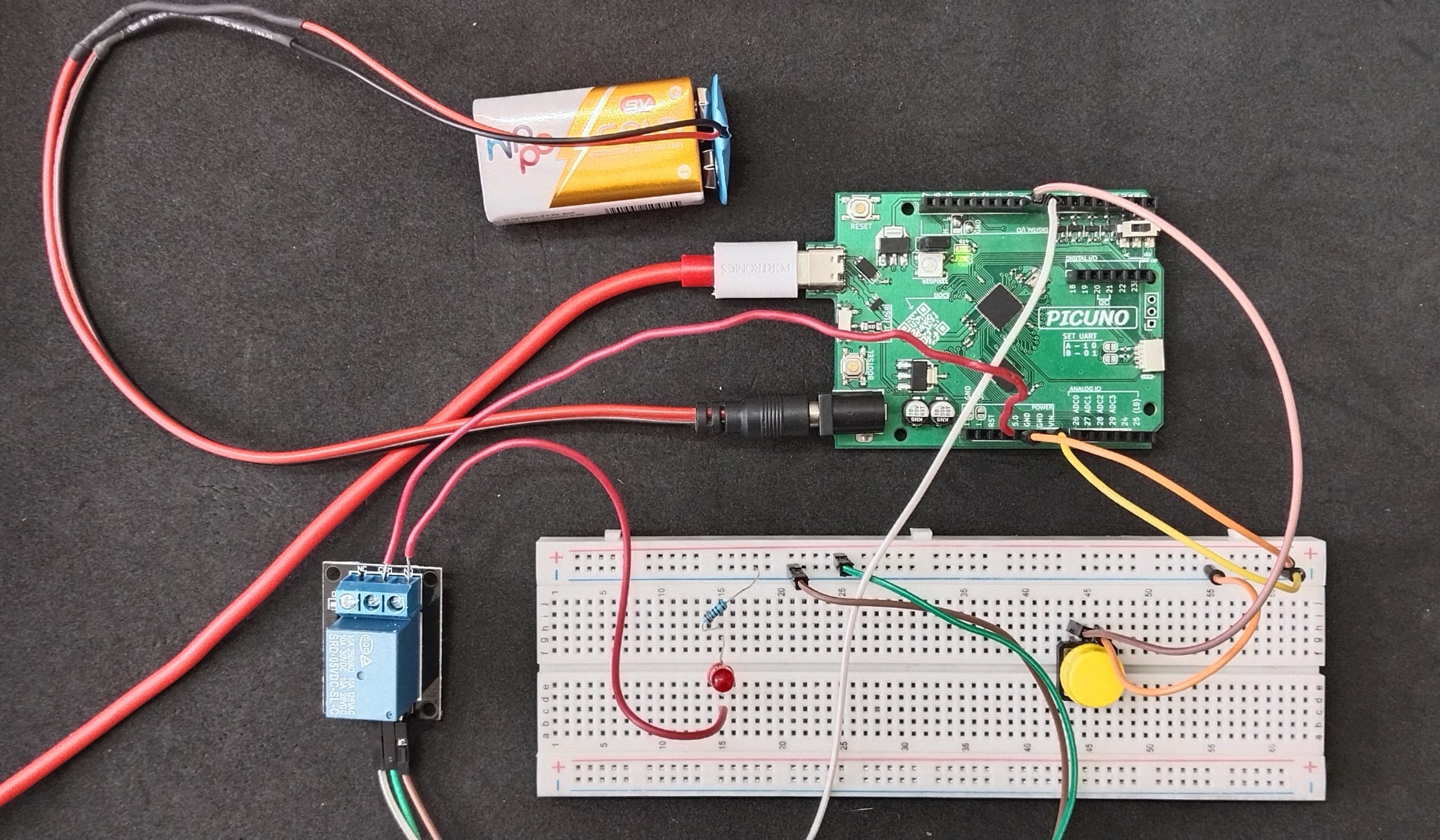
HARDWARE REQUIRED:
- PICUNO Microcontroller board
- 1 × 5V Relay Module
- 1 × Push Button
- 1 × LED
- 1 × 220Ω resistor (Current-limiting resistor)
- 9V Battery with a snap connector (to power the board via the DC Jack)
- Jumper wires
- USB cable
DESCRIPTION:
This project demonstrates how to create a time-delayed power-off switch, a common feature in many real-world appliances. When a user presses a push button, it triggers a relay to turn on a separate circuit, in this case, powering an LED. The device then stays on for a predefined duration (e.g., 10 seconds) and automatically shuts off. The project uses a non-blocking timer, allowing the microcontroller to remain responsive to other tasks while waiting for the countdown to finish.
CIRCUIT DIAGRAM:
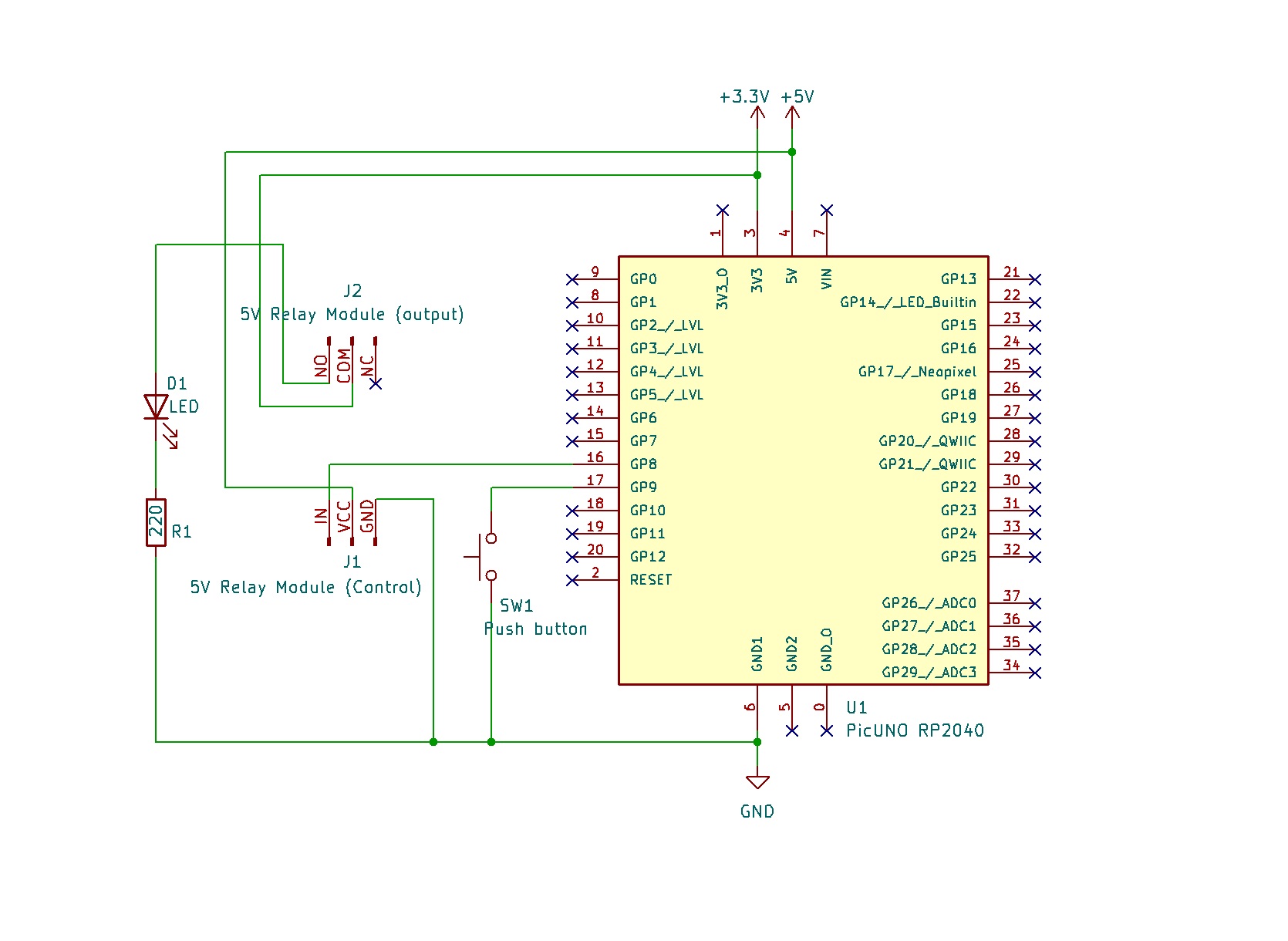
- Connect the Relay Module's GND pin to a GND pin on PICUNO.
- Connect the Relay Module's VCC pin to the 5V pin on PICUNO.
- Connect the Relay Module's IN (Signal) pin to GPIO 8.
- Connect one leg of the Push Button to GPIO 9.
- Connect the other leg of the Push Button to GND.
- Connect the COM (Common) Screw terminal on the relay to 3.3V.
- Connect the NO (Normally Open) Screw terminal on the relay to longer leg (anode) of the LED.
- Connect the shorter leg (cathode) of the LED to one end of 220Ω resistor.
- Connect the other end of the resistor to GND.
SCHEMATIC:
Relay VCC → 5V
Relay GND → GND
Relay IN → GPIO 8
One leg of Push Button → GPIO 9
Other leg of Push Button → GND
Relay COM → 3.3V
Relay NO → anode of LED
Cathode of LED → 220Ω resistor → GND
CODE -- C:
const int BUTTON_PIN = 9;
const int RELAY_PIN = 8;
const long ON_DURATION = 10000; // 10 seconds
bool relayIsOn = false;
unsigned long startTime = 0;
void setup() {
pinMode(RELAY_PIN, OUTPUT);
pinMode(BUTTON_PIN, INPUT_PULLUP);
digitalWrite(RELAY_PIN, LOW); // Start with relay off
}
void loop() {
// 1. Check if the button is pressed to turn the relay ON
if (digitalRead(BUTTON_PIN) == LOW && !relayIsOn) {
relayIsOn = true;
digitalWrite(RELAY_PIN, HIGH);
startTime = millis(); // Record the time when it turned on
}
// 2. If the relay is on, check if its time is up
if (relayIsOn && (millis() - startTime >= ON_DURATION)) {
relayIsOn = false;
digitalWrite(RELAY_PIN, LOW); // Turn the relay OFF
}
}
const int RELAY_PIN = 8;
const long ON_DURATION = 10000; // 10 seconds
bool relayIsOn = false;
unsigned long startTime = 0;
void setup() {
pinMode(RELAY_PIN, OUTPUT);
pinMode(BUTTON_PIN, INPUT_PULLUP);
digitalWrite(RELAY_PIN, LOW); // Start with relay off
}
void loop() {
// 1. Check if the button is pressed to turn the relay ON
if (digitalRead(BUTTON_PIN) == LOW && !relayIsOn) {
relayIsOn = true;
digitalWrite(RELAY_PIN, HIGH);
startTime = millis(); // Record the time when it turned on
}
// 2. If the relay is on, check if its time is up
if (relayIsOn && (millis() - startTime >= ON_DURATION)) {
relayIsOn = false;
digitalWrite(RELAY_PIN, LOW); // Turn the relay OFF
}
}
const long ON_DURATION = 10000; - Sets the desired on-time for the relay in milliseconds (10,000ms = 10s).
bool relayIsOn = false; - A state variable or "flag" that helps the code remember whether the timer is currently running.
if (digitalRead(BUTTON_PIN) == LOW && !relayIsOn) - This line checks for two conditions: that the button is pressed, AND that the timer isn't already running. This prevents the timer from resetting if the button is pressed again.
startTime = millis(); - When the relay turns on, this line records the exact moment in time.
if (relayIsOn && (millis() - startTime >= ON_DURATION)) - This is the core non-blocking logic. It continuously subtracts the startTime from the current time (millis()) to see how much time has passed. When the elapsed time is greater than or equal to ON_DURATION, it turns the relay off.
bool relayIsOn = false; - A state variable or "flag" that helps the code remember whether the timer is currently running.
if (digitalRead(BUTTON_PIN) == LOW && !relayIsOn) - This line checks for two conditions: that the button is pressed, AND that the timer isn't already running. This prevents the timer from resetting if the button is pressed again.
startTime = millis(); - When the relay turns on, this line records the exact moment in time.
if (relayIsOn && (millis() - startTime >= ON_DURATION)) - This is the core non-blocking logic. It continuously subtracts the startTime from the current time (millis()) to see how much time has passed. When the elapsed time is greater than or equal to ON_DURATION, it turns the relay off.
CODE -- PYTHON:
from machine import Pin
from time import sleep_ms, ticks_ms, ticks_diff
button = Pin(9, Pin.IN, Pin.PULL_UP)
relay = Pin(8, Pin.OUT)
ON_DURATION = 10000 # 10 seconds
relay_is_on = False
start_time = 0
relay.value(0)
while True:
# 1. Check if the button is pressed to turn the relay ON
if button.value() == 0 and not relay_is_on:
relay_is_on = True
relay.value(1) # Turn relay ON
start_time = ticks_ms() # Record start time
sleep_ms(200)
# 2. If the relay is on, check if its time is up
if relay_is_on and ticks_diff(ticks_ms(), start_time) >= ON_DURATION:
relay_is_on = False
relay.value(0) # Turn relay OFF
sleep_ms(10)
from time import sleep_ms, ticks_ms, ticks_diff
button = Pin(9, Pin.IN, Pin.PULL_UP)
relay = Pin(8, Pin.OUT)
ON_DURATION = 10000 # 10 seconds
relay_is_on = False
start_time = 0
relay.value(0)
while True:
# 1. Check if the button is pressed to turn the relay ON
if button.value() == 0 and not relay_is_on:
relay_is_on = True
relay.value(1) # Turn relay ON
start_time = ticks_ms() # Record start time
sleep_ms(200)
# 2. If the relay is on, check if its time is up
if relay_is_on and ticks_diff(ticks_ms(), start_time) >= ON_DURATION:
relay_is_on = False
relay.value(0) # Turn relay OFF
sleep_ms(10)
ON_DURATION = 10000 - Sets the on-time for the relay in milliseconds.
relay_is_on = False - A "flag" to keep track of whether the timer countdown is active.
if button.value() == 0 and not relay_is_on: - Checks for a button press but only allows the timer to start if it's not already running.
start_time = ticks_ms() - Records the precise timestamp when the relay is turned on.
if relay_is_on and ticks_diff(ticks_ms(), start_time) >= ON_DURATION: - This is the non-blocking timer. ticks_diff safely calculates the elapsed time, even when the internal millisecond counter wraps around. If the elapsed time reaches the ON_DURATION, it turns the relay off.
relay_is_on = False - A "flag" to keep track of whether the timer countdown is active.
if button.value() == 0 and not relay_is_on: - Checks for a button press but only allows the timer to start if it's not already running.
start_time = ticks_ms() - Records the precise timestamp when the relay is turned on.
if relay_is_on and ticks_diff(ticks_ms(), start_time) >= ON_DURATION: - This is the non-blocking timer. ticks_diff safely calculates the elapsed time, even when the internal millisecond counter wraps around. If the elapsed time reaches the ON_DURATION, it turns the relay off.