IR Remote Decoder With LCD Display
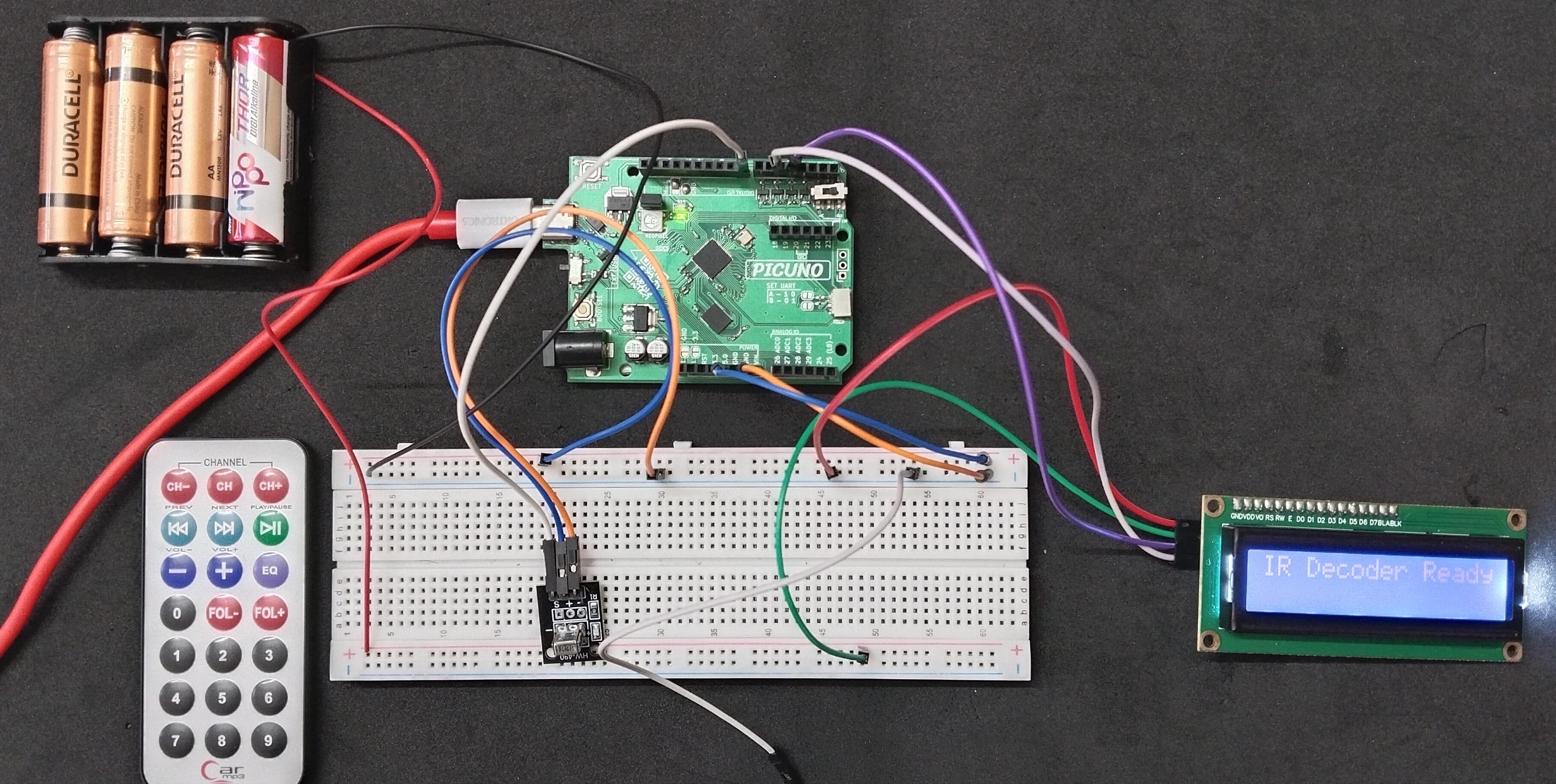
HARDWARE REQUIRED:
- PICUNO Microcontroller board
- 1 × HW-490 IR Receiver Module
- 1 × IR Remote Display
- 1 × I2C LCD Display
- 1 × 4xAA Battery Pack (For external supply)
- Jumper wires
- USB cable
DESCRIPTION:
This project turns the board into a tool that can read the signals from any standard IR remote. When you press a button on the remote, the program decodes the signal and displays the unique hexadecimal code for that button on a 16x2 LCD screen. This is the essential first step for any project that you want to control wirelessly with a remote.
LIBRARIES REQUIRED:
For C / Arduino IDE:
IRremote by shirriff, z3t0, ArminJo: The driver library for the IR receiver Module.
Wire.h: Manages I2C communication (usually included by default).
LiquidCrystal_I2C.h: The driver library for the I2C LCD module.
For Micropython / Thonny IDE:
ir_rx.py: The custom library file for the IR receiver module, saved to the PICUNO board.
i2c_lcd.py: The custom library file saved to the PICUNO board.
The code also uses the built-in machine and time modules.
LIBRARIES REQUIRED:
For C / Arduino IDE:
IRremote by shirriff, z3t0, ArminJo: The driver library for the IR receiver Module.
Wire.h: Manages I2C communication (usually included by default).
LiquidCrystal_I2C.h: The driver library for the I2C LCD module.
For Micropython / Thonny IDE:
ir_rx.py: The custom library file for the IR receiver module, saved to the PICUNO board.
i2c_lcd.py: The custom library file saved to the PICUNO board.
The code also uses the built-in machine and time modules.
CIRCUIT DIAGRAM:
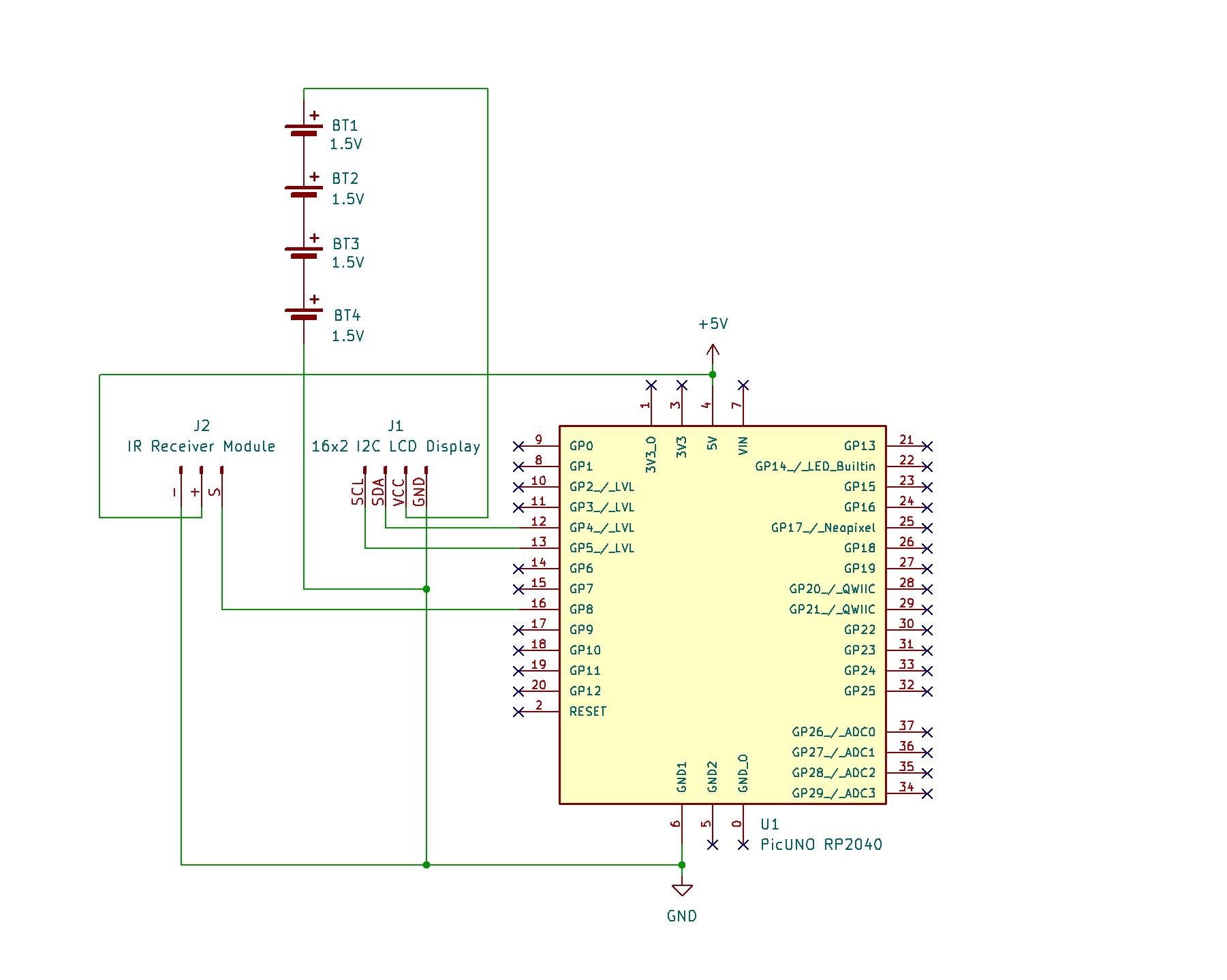
- Connect the LCD Module's GND pin to GND.
- Connect the LCD Module's VCC pin to the Positive (+) terminal of the 4xAA Battery Pack.
- Connect the LCD Module's SDA pin GPIO 4 (SDA Pin on PICUNO).
- Connect the LCD Module's SCL pin GPIO 5 (SCL Pin on PICUNO).
- Connect the negative terminal of the 4xAA Battery Pack to Common GND on breadboard.
- Connect the GND (-) pin to GND pin.
- Connect the VCC (+) pin to 5V.
- Connect the Signal (S) pin to GPIO 8.
SCHEMATIC:
I2C LCD Display:
LCD VCC → 4xAA Battery Pack (+)
LCD GND → GND
LCD SDA → GPIO 4 (Board SDA Pin)
LCD SCL → GPIO 5 (Board SCL Pin)
IR Receiver Module:
VCC / (+) → 5V
GND / (-) → GND
Signal (S) → GPIO 8
Common Ground Connection:
4xAA Battery Pack (-) → PICUNO Board GND
CODE -- C:
#include <IRremote.hpp>
#include <Wire.h>
#include <LiquidCrystal_I2C.h>
const int RECV_PIN = 8;
LiquidCrystal_I2C lcd(0x27, 16, 2);
void setup() {
Serial.begin(9600);
while (!Serial) {
;
}
IrReceiver.begin(RECV_PIN, ENABLE_LED_FEEDBACK);
lcd.init();
lcd.backlight();
lcd.clear();
lcd.setCursor(0, 0);
lcd.print("IR Receiver Ready");
Serial.println("IR Receiver Ready. Point remote and press a button.");
}
void loop() {
if (IrReceiver.decode()) {
if (IrReceiver.decodedIRData.decodedRawData != 0) {
unsigned long code = IrReceiver.decodedIRData.decodedRawData;
Serial.println(code, HEX);
lcd.clear();
lcd.setCursor(0, 0);
lcd.print("IR Code Recvd:");
lcd.setCursor(0, 1);
lcd.print("0x");
lcd.print(code, HEX);
}
IrReceiver.resume();
}
}
#include <Wire.h>
#include <LiquidCrystal_I2C.h>
const int RECV_PIN = 8;
LiquidCrystal_I2C lcd(0x27, 16, 2);
void setup() {
Serial.begin(9600);
while (!Serial) {
;
}
IrReceiver.begin(RECV_PIN, ENABLE_LED_FEEDBACK);
lcd.init();
lcd.backlight();
lcd.clear();
lcd.setCursor(0, 0);
lcd.print("IR Receiver Ready");
Serial.println("IR Receiver Ready. Point remote and press a button.");
}
void loop() {
if (IrReceiver.decode()) {
if (IrReceiver.decodedIRData.decodedRawData != 0) {
unsigned long code = IrReceiver.decodedIRData.decodedRawData;
Serial.println(code, HEX);
lcd.clear();
lcd.setCursor(0, 0);
lcd.print("IR Code Recvd:");
lcd.setCursor(0, 1);
lcd.print("0x");
lcd.print(code, HEX);
}
IrReceiver.resume();
}
}
#include <IRremote.hpp> - Imports the modern library required for receiving and decoding infrared remote signals.
IrReceiver.begin(...) - Initializes the IR receiver on a specific pin and enables the board's built-in LED to blink as feedback when a signal is received.
if (IrReceiver.decode()) - This is the main function from the IR library. It constantly checks if a new, complete IR signal has been received and successfully decoded.
if (IrReceiver.decodedIRData.decodedRawData != 0) - This is a filter. It checks if the received code is a valid, non-zero number. This is used to ignore empty signals or repeat codes, ensuring only the main button press code is displayed.
IrReceiver.resume() - After a code has been received and processed, this command tells the receiver to clear its buffer and start listening for the next new signal.
lcd.print(code, HEX) - This command prints the received code to the LCD. The HEX part is important as it formats the long number into the shorter, standard hexadecimal format (e.g., F30CFF00) that is commonly used for IR codes.
IrReceiver.begin(...) - Initializes the IR receiver on a specific pin and enables the board's built-in LED to blink as feedback when a signal is received.
if (IrReceiver.decode()) - This is the main function from the IR library. It constantly checks if a new, complete IR signal has been received and successfully decoded.
if (IrReceiver.decodedIRData.decodedRawData != 0) - This is a filter. It checks if the received code is a valid, non-zero number. This is used to ignore empty signals or repeat codes, ensuring only the main button press code is displayed.
IrReceiver.resume() - After a code has been received and processed, this command tells the receiver to clear its buffer and start listening for the next new signal.
lcd.print(code, HEX) - This command prints the received code to the LCD. The HEX part is important as it formats the long number into the shorter, standard hexadecimal format (e.g., F30CFF00) that is commonly used for IR codes.
CODE -- PYTHON:
from machine import Pin, I2C
from ir_rx import IR_RX
from i2c_lcd import I2cLcd
import time
IR_PIN = 8
i2c = I2C(0, scl=Pin(5), sda=Pin(4))
lcd = I2cLcd(i2c, 0x27, 2, 16)
def ir_callback(data, addr, ctrl):
if data > 0:
print(f"Received IR Code: {hex(data)}")
lcd.clear()
lcd.putstr("Code Received:")
lcd.move_to(0, 1)
lcd.putstr(hex(data))
receiver = IR_RX(Pin(IR_PIN, Pin.IN), ir_callback)
lcd.putstr("IR Decoder Ready")
print("IR Decoder Ready. Press a remote button.")
while True:
time.sleep(1)
from ir_rx import IR_RX
from i2c_lcd import I2cLcd
import time
IR_PIN = 8
i2c = I2C(0, scl=Pin(5), sda=Pin(4))
lcd = I2cLcd(i2c, 0x27, 2, 16)
def ir_callback(data, addr, ctrl):
if data > 0:
print(f"Received IR Code: {hex(data)}")
lcd.clear()
lcd.putstr("Code Received:")
lcd.move_to(0, 1)
lcd.putstr(hex(data))
receiver = IR_RX(Pin(IR_PIN, Pin.IN), ir_callback)
lcd.putstr("IR Decoder Ready")
print("IR Decoder Ready. Press a remote button.")
while True:
time.sleep(1)
ir_rx.py Library - This custom library runs in the background using interrupts to constantly listen for IR signals.
ir_callback() Function - This is an interrupt-driven function. It runs automatically whenever a new IR code is received and contains the logic to update the LCD.
hex(data) - A built-in Python function that converts the received number into a more readable hexadecimal string (e.g., '0xff30cf') for display.
lcd.move_to() - The command from your LCD library that moves the cursor to the second line before printing the code.
ir_callback() Function - This is an interrupt-driven function. It runs automatically whenever a new IR code is received and contains the logic to update the LCD.
hex(data) - A built-in Python function that converts the received number into a more readable hexadecimal string (e.g., '0xff30cf') for display.
lcd.move_to() - The command from your LCD library that moves the cursor to the second line before printing the code.