Digital Object Counter
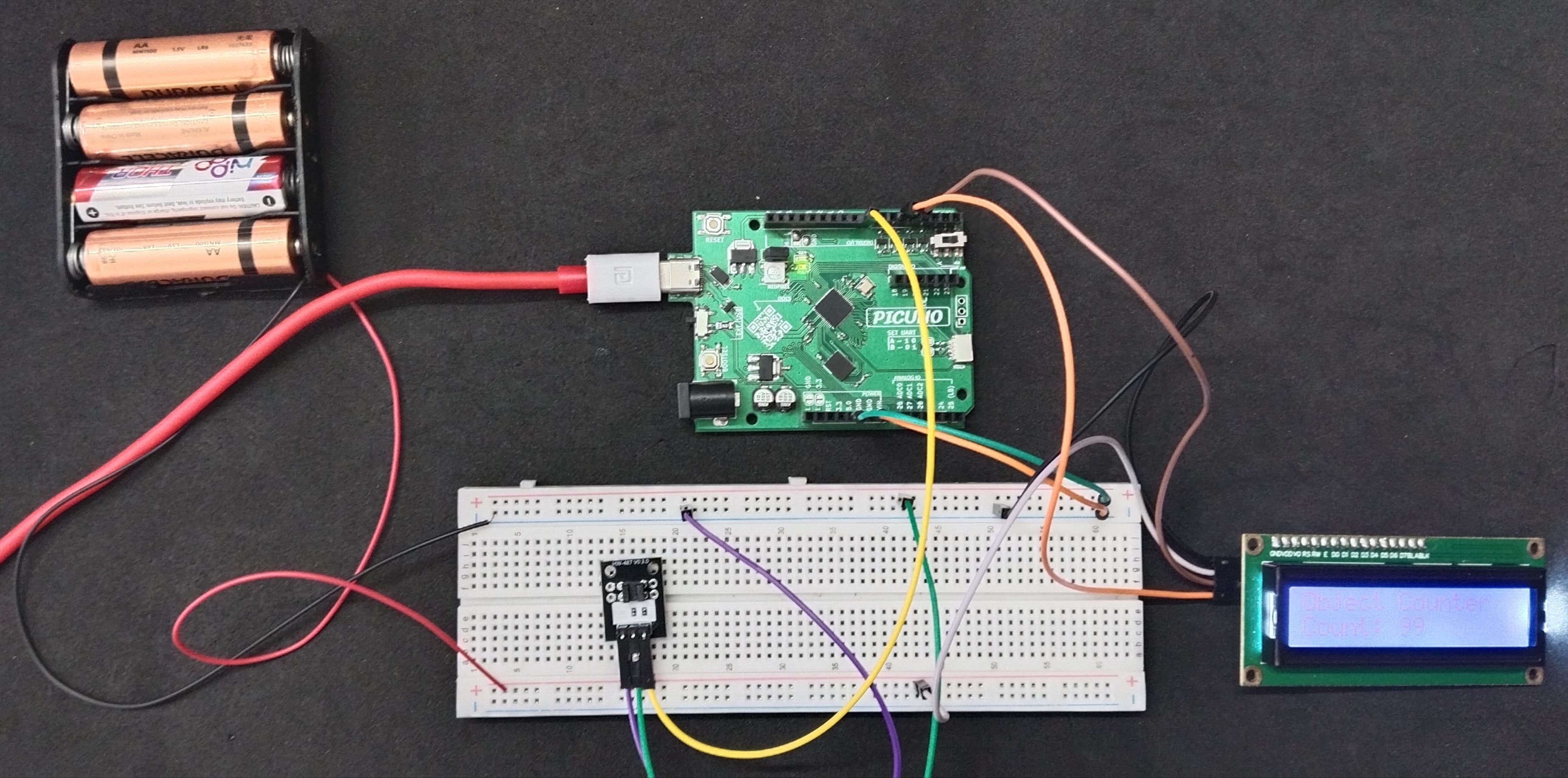
HARDWARE REQUIRED:
- PICUNO Microcontroller board
- 1 × HW-487 Light Blocking Sensor
- 1 × I2C LCD Display
- 1 × 4xAA Battery Pack (For external supply)
- Jumper wires
- USB cable
DESCRIPTION:
This project turns the sensor into a simple but accurate counter. You will position the sensor so you can drop small objects (like coins or beads) through its U-shaped slot. Every time an object passes through and breaks the invisible light beam, a counter on the LCD Display will increase by one. This demonstrates a fundamental principle used in industrial automation, like counting items on a conveyor belt.
CIRCUIT DIAGRAM:
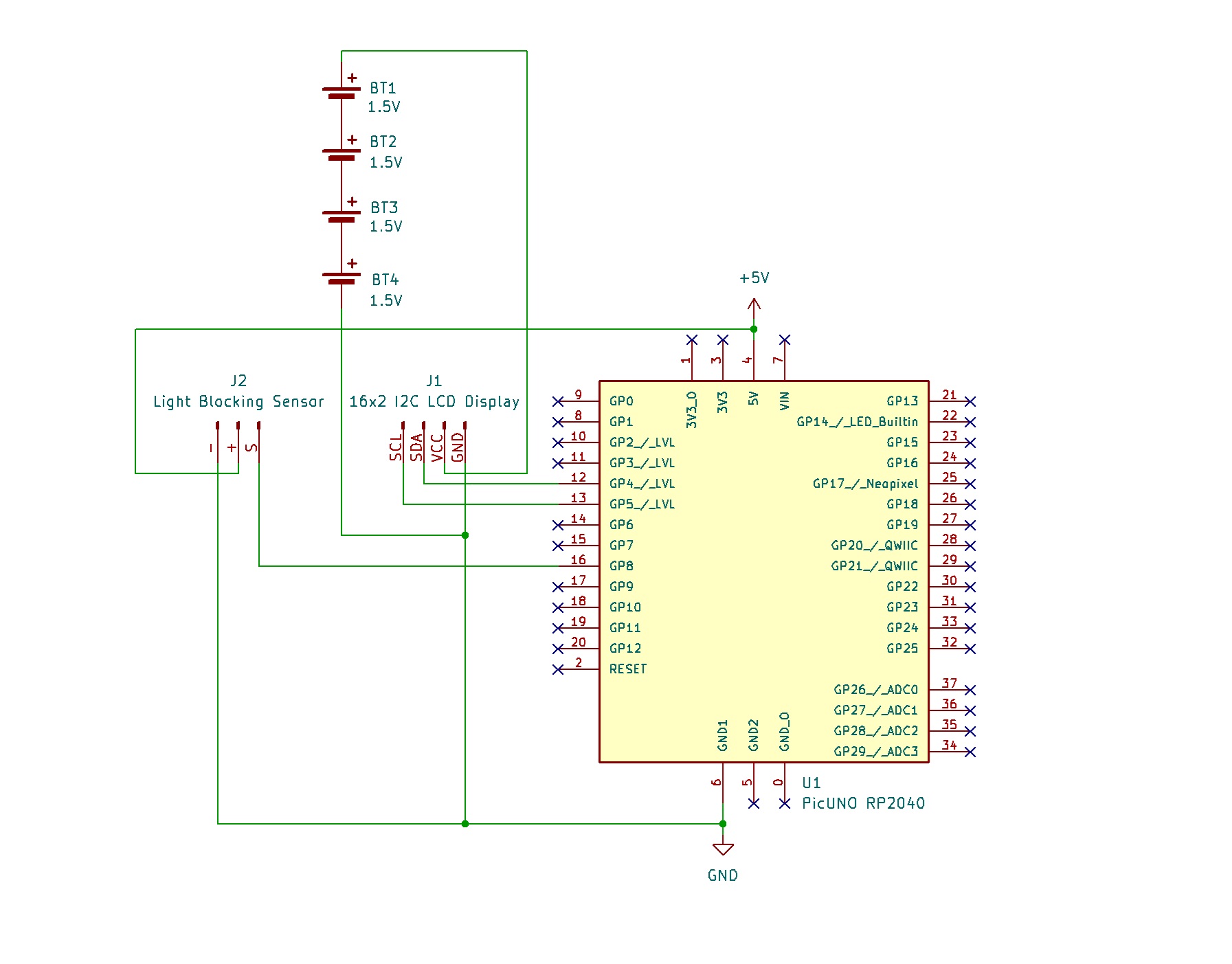
- Connect the LCD Module's GND pin to GND.
- Connect the LCD Module's VCC pin to the Positive (+) terminal of the 4xAA Battery Pack.
- Connect the LCD Module's SDA pin GPIO 4 (SDA Pin on PICUNO).
- Connect the LCD Module's SCL pin GPIO 5 (SCL Pin on PICUNO).
- Connect the negative terminal of the 4xAA Battery Pack to Common GND on breadboard.
- Connect the GND (-) pin to GND pin.
- Connect the VCC (+) pin to 5V.
- Connect the Signal (S) pin to GPIO 8.
SCHEMATIC:
I2C LCD Display:
LCD VCC → 4xAA Battery Pack (+)
LCD GND → GND
LCD SDA → GPIO 4 (Board SDA Pin)
LCD SCL → GPIO 5 (Board SCL Pin)
Light Blocking Sensor:
VCC / (+) → 5V
GND / (-) → GND
Signal (S) → GPIO 8
Common Ground Connection:
4xAA Battery Pack (-) → PICUNO Board GND
CODE -- C:
#include <Wire.h>
#include <LiquidCrystal_I2C.h>
const int SENSOR_PIN = 8;
LiquidCrystal_I2C lcd(0x27, 16, 2);
long objectCount = 0;
int lastSensorState = LOW; // Remembers the sensor's state from the last loop
void setup() {
pinMode(SENSOR_PIN, INPUT);
lcd.init();
lcd.backlight();
updateDisplay();
}
void loop() {
// Read the sensor's current state
int currentSensorState = digitalRead(SENSOR_PIN);
if (currentSensorState == HIGH && lastSensorState == LOW) {
// Increment the counter
objectCount++;
updateDisplay();
delay(50);
}
lastSensorState = currentSensorState;
}
// Helper function to update the LCD
void updateDisplay() {
lcd.clear();
lcd.setCursor(0, 0);
lcd.print("Object Counter");
lcd.setCursor(0, 1);
lcd.print("Count: ");
lcd.print(objectCount);
}
#include <LiquidCrystal_I2C.h>
const int SENSOR_PIN = 8;
LiquidCrystal_I2C lcd(0x27, 16, 2);
long objectCount = 0;
int lastSensorState = LOW; // Remembers the sensor's state from the last loop
void setup() {
pinMode(SENSOR_PIN, INPUT);
lcd.init();
lcd.backlight();
updateDisplay();
}
void loop() {
// Read the sensor's current state
int currentSensorState = digitalRead(SENSOR_PIN);
if (currentSensorState == HIGH && lastSensorState == LOW) {
// Increment the counter
objectCount++;
updateDisplay();
delay(50);
}
lastSensorState = currentSensorState;
}
// Helper function to update the LCD
void updateDisplay() {
lcd.clear();
lcd.setCursor(0, 0);
lcd.print("Object Counter");
lcd.setCursor(0, 1);
lcd.print("Count: ");
lcd.print(objectCount);
}
lastSensorState - A variable that acts as the program's memory, storing what the sensor's state was in the previous loop cycle.
State Change Detection - The logic if (currentSensorState == HIGH && lastSensorState == LOW) is the core of the project. It only triggers when the sensor first detects an object, not continuously while the object is there.
Debouncing (delay(50)) - This small pause prevents a single object from being accidentally counted multiple times due to signal noise.
State Change Detection - The logic if (currentSensorState == HIGH && lastSensorState == LOW) is the core of the project. It only triggers when the sensor first detects an object, not continuously while the object is there.
Debouncing (delay(50)) - This small pause prevents a single object from being accidentally counted multiple times due to signal noise.
CODE -- PYTHON:
from machine import Pin, I2C
from time import sleep_ms
from i2c_lcd import I2cLcd
SENSOR_PIN = 8
I2C_ADDR = 0x27
i2c = I2C(0, scl=Pin(5), sda=Pin(4))
lcd = I2cLcd(i2c, I2C_ADDR, 2, 16)
object_count = 0
last_sensor_state = 0 # 0 for LOW
# --- Helper Function ---
def update_display():
lcd.clear()
lcd.putstr("Object Counter")
lcd.move_to(0, 1)
lcd.putstr(f"Count: {object_count}")
# --- Initial Setup ---
sensor = Pin(SENSOR_PIN, Pin.IN)
update_display()
print("Object Counter Ready.")
# --- Main Loop ---
while True:
current_sensor_state = sensor.value()
if current_sensor_state == 1 and last_sensor_state == 0:
object_count += 1
print(f"Object detected! New count: {object_count}")
update_display()
sleep_ms(50)
last_sensor_state = current_sensor_state
sleep_ms(10)
from time import sleep_ms
from i2c_lcd import I2cLcd
SENSOR_PIN = 8
I2C_ADDR = 0x27
i2c = I2C(0, scl=Pin(5), sda=Pin(4))
lcd = I2cLcd(i2c, I2C_ADDR, 2, 16)
object_count = 0
last_sensor_state = 0 # 0 for LOW
# --- Helper Function ---
def update_display():
lcd.clear()
lcd.putstr("Object Counter")
lcd.move_to(0, 1)
lcd.putstr(f"Count: {object_count}")
# --- Initial Setup ---
sensor = Pin(SENSOR_PIN, Pin.IN)
update_display()
print("Object Counter Ready.")
# --- Main Loop ---
while True:
current_sensor_state = sensor.value()
if current_sensor_state == 1 and last_sensor_state == 0:
object_count += 1
print(f"Object detected! New count: {object_count}")
update_display()
sleep_ms(50)
last_sensor_state = current_sensor_state
sleep_ms(10)
last_sensor_state - A variable that holds the sensor's value (0 or 1) from the previous loop cycle.
State Change Detection - The line if current_sensor_state == 1 and last_sensor_state == 0: is the core logic. It ensures the count only increases on the "rising edge" of the signal—the exact moment an object enters the slot.
update_display() - A helper function used to refresh the LCD screen with the new count, keeping the main loop clean.
State Change Detection - The line if current_sensor_state == 1 and last_sensor_state == 0: is the core logic. It ensures the count only increases on the "rising edge" of the signal—the exact moment an object enters the slot.
update_display() - A helper function used to refresh the LCD screen with the new count, keeping the main loop clean.