Digital Stopwatch Using 4-Digit 7-Segment Display
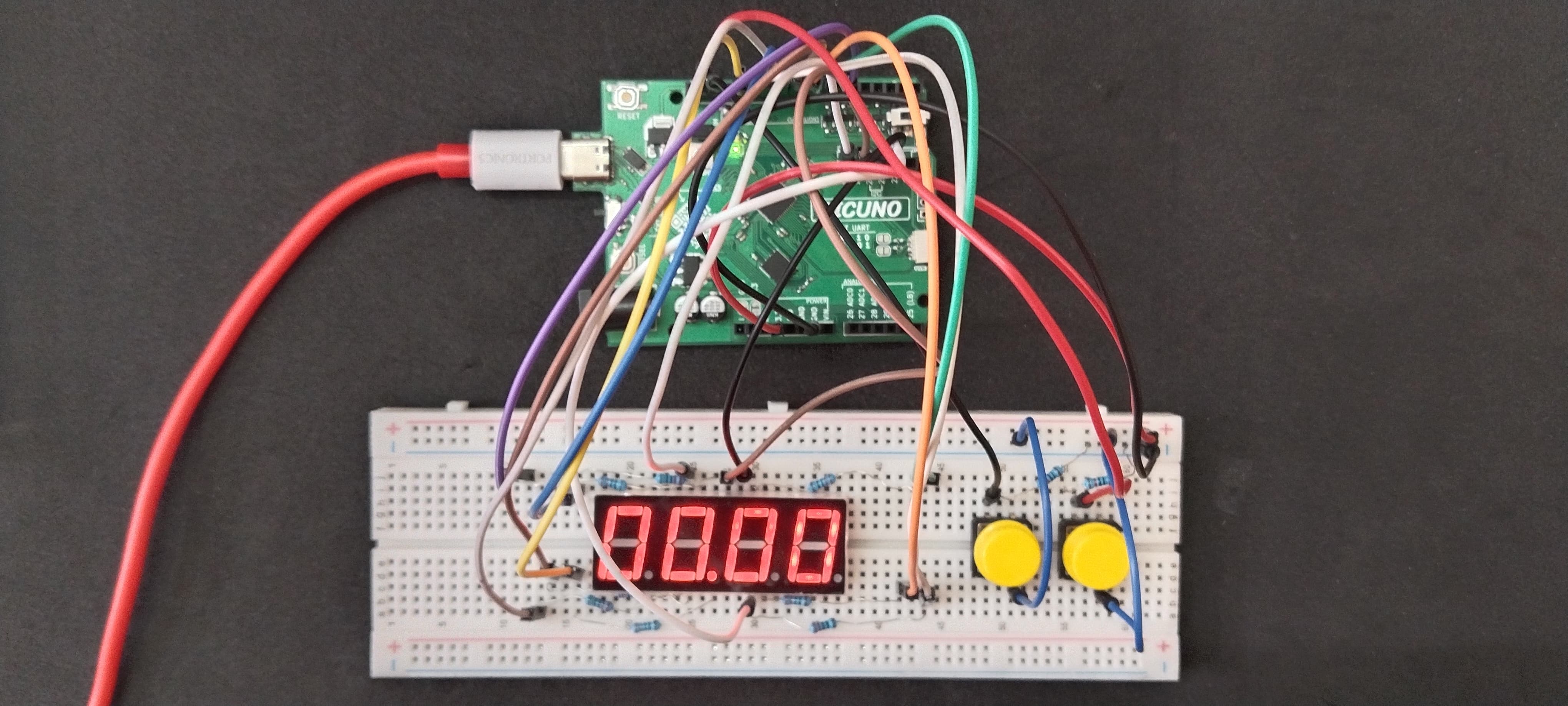
HARDWARE REQUIRED:
- PICUNO Microcontroller board
- 1 × 5461AS-1 4-Digit 7-Segment Display (Common Cathode)
- 2 × Push Buttons
- 2 × 10kΩ resistor (pull-down)
- 8 × 220Ω resistors (Current limiting for LEDs)
- Breadboard
- Jumper wires
- USB cable
DESCRIPTION:
This project implements a digital stopwatch using a 4-digit 7-segment common cathode display (5461AS-1) and two push buttons. The stopwatch displays time in MM:SS format by rapidly switching between 4 digits using time multiplexing. A decimal point between the second and third digits acts as a colon separator. Button 1 starts/stops the stopwatch. Button 2 resets the stopwatch to 00:00.
CIRCUIT DIAGRAM:
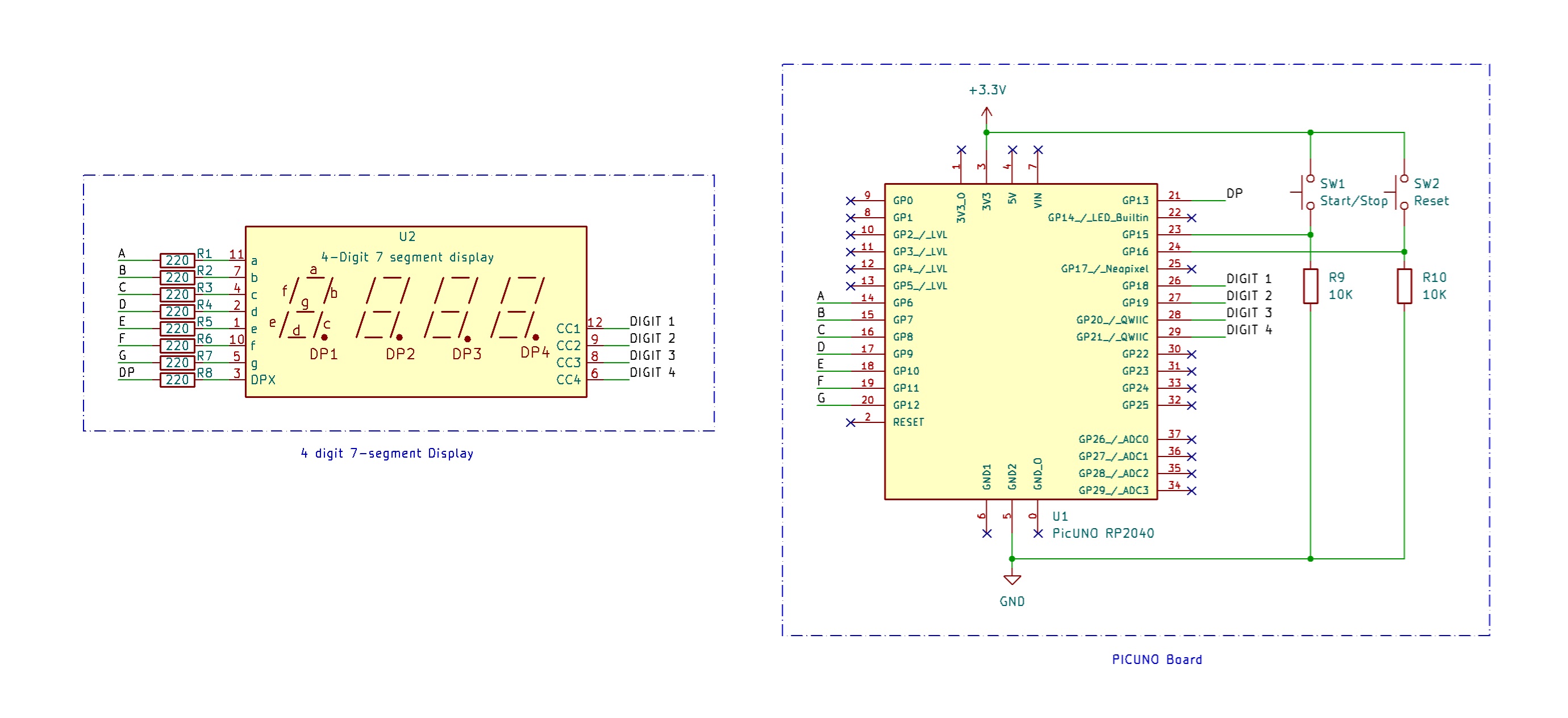
- Connect the PICUNO board to the computer using a USB cable.
- Connect segment pins A to G and DP of display to GPIO 6 to 13 using 220Ω resistors.
- Connect Digit pins 1,2,3,4 of the display to GPIO 18,19,20,21 respectively.
- Connect one side of both Start/Stop and Reset buttons to 3.3 V.
- Connect the other sides of the buttons to GPIO 15 and 16 respectively and connect a 10kΩ resistor from each GPIO to GND.
SCHEMATIC:
A → 220Ω → GPIO 6
B → 220Ω → GPIO 7
C → 220Ω → GPIO 8
D → 220Ω → GPIO 9
E → 220Ω → GPIO 10
F → 220Ω → GPIO 11
G → 220Ω → GPIO 12
DP → 220Ω → GPIO 13
Digit 1 → GPIO 18
Digit 2 → GPIO 19
Digit 3 → GPIO 20
Digit 4 → GPIO 21
Start/Stop Button one side → 3.3 V
Other side → GPIO 15 → 10kΩ → GND
Reset Button one side → 3.3 V
Other side → GPIO 16 → 10kΩ → GND
CODE -- C:
const int segmentPins[] = {6, 7, 8, 9, 10, 11, 12, 13}; // A-G, DP
const int digitPins[] = {18, 19, 20, 21}; // Digit 1-4
const int startStopBtn = 15;
const int resetBtn = 16;
int digits[10][7] = {
{1,1,1,1,1,1,0}, {0,1,1,0,0,0,0}, {1,1,0,1,1,0,1}, {1,1,1,1,0,0,1},
{0,1,1,0,0,1,1}, {1,0,1,1,0,1,1}, {1,0,1,1,1,1,1}, {1,1,1,0,0,0,0},
{1,1,1,1,1,1,1}, {1,1,1,1,0,1,1}
};
unsigned long previousMillis = 0;
int seconds = 0, minutes = 0;
bool running = false;
bool lastStartStopState = HIGH;
bool lastResetState = HIGH;
void setup() {
for (int i = 0; i < 8; i++) pinMode(segmentPins[i], OUTPUT);
for (int i = 0; i < 4; i++) pinMode(digitPins[i], OUTPUT);
pinMode(startStopBtn, INPUT);
pinMode(resetBtn, INPUT);
}
void loop() {
handleButtons();
if (running && millis() - previousMillis >= 1000) {
previousMillis = millis();
seconds++;
if (seconds >= 60) {
seconds = 0;
minutes = (minutes + 1) % 60;
}
}
displayTime();
}
void handleButtons() {
bool currentStartStop = digitalRead(startStopBtn);
if (currentStartStop == HIGH && lastStartStopState == LOW) {
running = !running;
delay(200);
}
lastStartStopState = currentStartStop;
bool currentReset = digitalRead(resetBtn);
if (currentReset == HIGH && lastResetState == LOW) {
running = false;
minutes = 0; seconds = 0;
delay(200);
}
lastResetState = currentReset;
}
void displayTime() {
int values[4] = {
minutes / 10,
minutes % 10,
seconds / 10,
seconds % 10
};
for (int i = 0; i < 4; i++) {
digitalWrite(digitPins[i], LOW);
showDigit(values[i]);
if (i == 1) {
digitalWrite(segmentPins[7], HIGH); // DP ON between D2 and D3
} else {
digitalWrite(segmentPins[7], LOW); // DP OFF
}
delay(2);
clearSegments();
digitalWrite(digitPins[i], HIGH);
}
}
void showDigit(int num) {
for (int i = 0; i < 7; i++) {
digitalWrite(segmentPins[i], digits[num][i]);
}
}
void clearSegments() {
for (int i = 0; i < 8; i++) {
digitalWrite(segmentPins[i], LOW);
}
}
const int digitPins[] = {18, 19, 20, 21}; // Digit 1-4
const int startStopBtn = 15;
const int resetBtn = 16;
int digits[10][7] = {
{1,1,1,1,1,1,0}, {0,1,1,0,0,0,0}, {1,1,0,1,1,0,1}, {1,1,1,1,0,0,1},
{0,1,1,0,0,1,1}, {1,0,1,1,0,1,1}, {1,0,1,1,1,1,1}, {1,1,1,0,0,0,0},
{1,1,1,1,1,1,1}, {1,1,1,1,0,1,1}
};
unsigned long previousMillis = 0;
int seconds = 0, minutes = 0;
bool running = false;
bool lastStartStopState = HIGH;
bool lastResetState = HIGH;
void setup() {
for (int i = 0; i < 8; i++) pinMode(segmentPins[i], OUTPUT);
for (int i = 0; i < 4; i++) pinMode(digitPins[i], OUTPUT);
pinMode(startStopBtn, INPUT);
pinMode(resetBtn, INPUT);
}
void loop() {
handleButtons();
if (running && millis() - previousMillis >= 1000) {
previousMillis = millis();
seconds++;
if (seconds >= 60) {
seconds = 0;
minutes = (minutes + 1) % 60;
}
}
displayTime();
}
void handleButtons() {
bool currentStartStop = digitalRead(startStopBtn);
if (currentStartStop == HIGH && lastStartStopState == LOW) {
running = !running;
delay(200);
}
lastStartStopState = currentStartStop;
bool currentReset = digitalRead(resetBtn);
if (currentReset == HIGH && lastResetState == LOW) {
running = false;
minutes = 0; seconds = 0;
delay(200);
}
lastResetState = currentReset;
}
void displayTime() {
int values[4] = {
minutes / 10,
minutes % 10,
seconds / 10,
seconds % 10
};
for (int i = 0; i < 4; i++) {
digitalWrite(digitPins[i], LOW);
showDigit(values[i]);
if (i == 1) {
digitalWrite(segmentPins[7], HIGH); // DP ON between D2 and D3
} else {
digitalWrite(segmentPins[7], LOW); // DP OFF
}
delay(2);
clearSegments();
digitalWrite(digitPins[i], HIGH);
}
}
void showDigit(int num) {
for (int i = 0; i < 7; i++) {
digitalWrite(segmentPins[i], digits[num][i]);
}
}
void clearSegments() {
for (int i = 0; i < 8; i++) {
digitalWrite(segmentPins[i], LOW);
}
}
const int segmentPins[] = {6, 7, 8, 9, 10, 11, 12, 13}; - Maps GPIO pins for segments A to G and DP of the 7-segment display.
const int digitPins[] = {18, 19, 20, 21}; - Controls which digit (D1 to D4) is active.
int digits[10][7] - Defines which segments (A-G) to light up for digits 0-9.
handleButtons() - Implements edge detection to toggle the running state on button press. Prevents multiple toggles due to button bounce using a software debounce (delay(200)).
if (millis() - previousMillis >= 1000) - Uses Arduino's millis() function to increment time every 1 second. Avoids using delay() so display stays responsive.
const int digitPins[] = {18, 19, 20, 21}; - Controls which digit (D1 to D4) is active.
int digits[10][7] - Defines which segments (A-G) to light up for digits 0-9.
handleButtons() - Implements edge detection to toggle the running state on button press. Prevents multiple toggles due to button bounce using a software debounce (delay(200)).
if (millis() - previousMillis >= 1000) - Uses Arduino's millis() function to increment time every 1 second. Avoids using delay() so display stays responsive.
CODE -- PYTHON:
from machine import Pin
import time
# Segment pins A-G + DP on GPIO 6 to 13
segmentPins = [Pin(i, Pin.OUT) for i in range(6, 14)]
# Digit control pins D1-D4 on GPIO 18 to 21
digitPins = [Pin(i, Pin.OUT) for i in range(18, 22)]
# Buttons
startStopBtn = Pin(15, Pin.IN)
resetBtn = Pin(16, Pin.IN)
# Digit segment bitmaps (A-G only)
digits = [
[1,1,1,1,1,1,0], [0,1,1,0,0,0,0], [1,1,0,1,1,0,1], [1,1,1,1,0,0,1],
[0,1,1,0,0,1,1], [1,0,1,1,0,1,1], [1,0,1,1,1,1,1], [1,1,1,0,0,0,0],
[1,1,1,1,1,1,1], [1,1,1,1,0,1,1]
]
# Timer vars
minutes = 0
seconds = 0
running = False
lastStartStop = 0
lastReset = 0
lastMillis = time.ticks_ms()
def clearSegments():
for pin in segmentPins:
pin.value(0)
def showDigit(num):
for i in range(7):
segmentPins[i].value(digits[num][i])
def displayTime():
values = [
minutes // 10,
minutes % 10,
seconds // 10,
seconds % 10
]
for i in range(4):
digitPins[i].value(0) # Enable digit (LOW)
showDigit(values[i])
# DP ON only after digit 2
if i == 1:
segmentPins[7].value(1)
else:
segmentPins[7].value(0)
time.sleep_ms(2)
clearSegments()
digitPins[i].value(1) # Disable digit (HIGH)
while True:
# Button logic
if startStopBtn.value() == 1 and lastStartStop == 0:
running = not running
time.sleep_ms(200)
lastStartStop = startStopBtn.value()
if resetBtn.value() == 1 and lastReset == 0:
running = False
minutes = 0
seconds = 0
time.sleep_ms(200)
lastReset = resetBtn.value()
# Time counting logic
if running and time.ticks_diff(time.ticks_ms(), lastMillis) >= 1000:
lastMillis = time.ticks_ms()
seconds += 1
if seconds >= 60:
seconds = 0
minutes = (minutes + 1) % 60
# Display update
displayTime()
import time
# Segment pins A-G + DP on GPIO 6 to 13
segmentPins = [Pin(i, Pin.OUT) for i in range(6, 14)]
# Digit control pins D1-D4 on GPIO 18 to 21
digitPins = [Pin(i, Pin.OUT) for i in range(18, 22)]
# Buttons
startStopBtn = Pin(15, Pin.IN)
resetBtn = Pin(16, Pin.IN)
# Digit segment bitmaps (A-G only)
digits = [
[1,1,1,1,1,1,0], [0,1,1,0,0,0,0], [1,1,0,1,1,0,1], [1,1,1,1,0,0,1],
[0,1,1,0,0,1,1], [1,0,1,1,0,1,1], [1,0,1,1,1,1,1], [1,1,1,0,0,0,0],
[1,1,1,1,1,1,1], [1,1,1,1,0,1,1]
]
# Timer vars
minutes = 0
seconds = 0
running = False
lastStartStop = 0
lastReset = 0
lastMillis = time.ticks_ms()
def clearSegments():
for pin in segmentPins:
pin.value(0)
def showDigit(num):
for i in range(7):
segmentPins[i].value(digits[num][i])
def displayTime():
values = [
minutes // 10,
minutes % 10,
seconds // 10,
seconds % 10
]
for i in range(4):
digitPins[i].value(0) # Enable digit (LOW)
showDigit(values[i])
# DP ON only after digit 2
if i == 1:
segmentPins[7].value(1)
else:
segmentPins[7].value(0)
time.sleep_ms(2)
clearSegments()
digitPins[i].value(1) # Disable digit (HIGH)
while True:
# Button logic
if startStopBtn.value() == 1 and lastStartStop == 0:
running = not running
time.sleep_ms(200)
lastStartStop = startStopBtn.value()
if resetBtn.value() == 1 and lastReset == 0:
running = False
minutes = 0
seconds = 0
time.sleep_ms(200)
lastReset = resetBtn.value()
# Time counting logic
if running and time.ticks_diff(time.ticks_ms(), lastMillis) >= 1000:
lastMillis = time.ticks_ms()
seconds += 1
if seconds >= 60:
seconds = 0
minutes = (minutes + 1) % 60
# Display update
displayTime()
segmentPins = [Pin(i, Pin.OUT) for i in range(6, 14)] - Initializes GPIO pins 6 to 13 as output pins for segments A-G and DP.
digitPins = [Pin(i, Pin.OUT) for i in range(18, 22)] - Initializes GPIOs 18 to 21 for digit select (D1-D4).
digits = [...] - 2D list representing segments (A-G) needed to form numbers 0-9.
def showDigit(num): - Lights up appropriate segments (A-G) to show the number num. DP is controlled separately from inside displayTime().
digitPins = [Pin(i, Pin.OUT) for i in range(18, 22)] - Initializes GPIOs 18 to 21 for digit select (D1-D4).
digits = [...] - 2D list representing segments (A-G) needed to form numbers 0-9.
def showDigit(num): - Lights up appropriate segments (A-G) to show the number num. DP is controlled separately from inside displayTime().