Dino Jumper Game In LCD Display
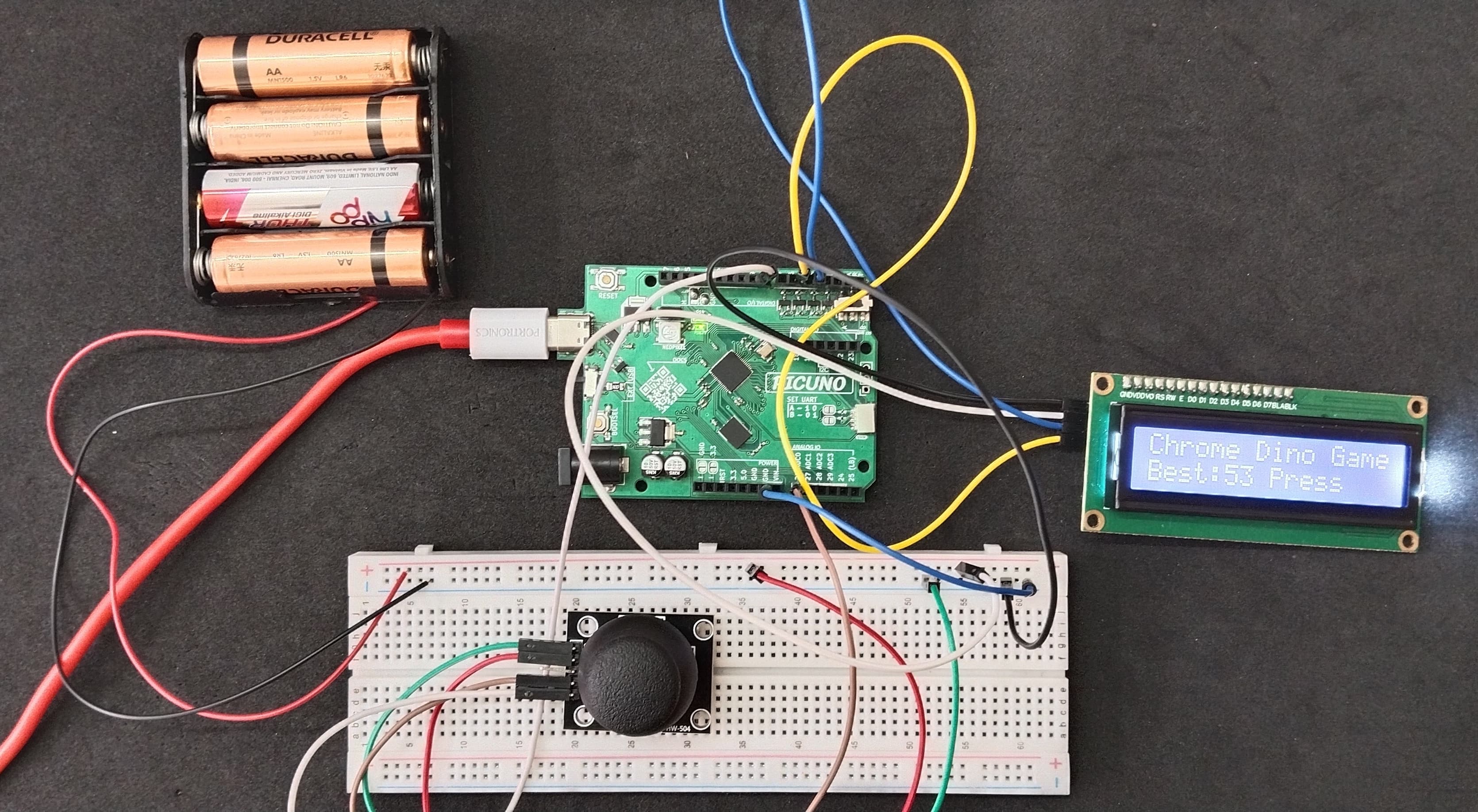
HARDWARE REQUIRED:
- PICUNO Microcontroller board
- 1 × 16x2 I2C LCD Display
- 1 × HW-504 Joystick Module
- Jumper wires
- USB cable
- 4xAA Battery Pack (for external power supply)
DESCRIPTION:
This project creates a complete, feature-rich "Chrome Dino" style side-scrolling game on a 16x2 character LCD. The player controls a dinosaur character who must dodge randomly spawning obstacles by switching between the top and bottom rows using a joystick. The game features a two-frame running animation, multiple obstacle types (cacti and birds), a real-time scoring system, and a "Game Over" state upon collision. To make it a complete experience, the game also saves the highest score to the microcontroller's permanent memory, displaying it on the start screen.
CIRCUIT DIAGRAM:
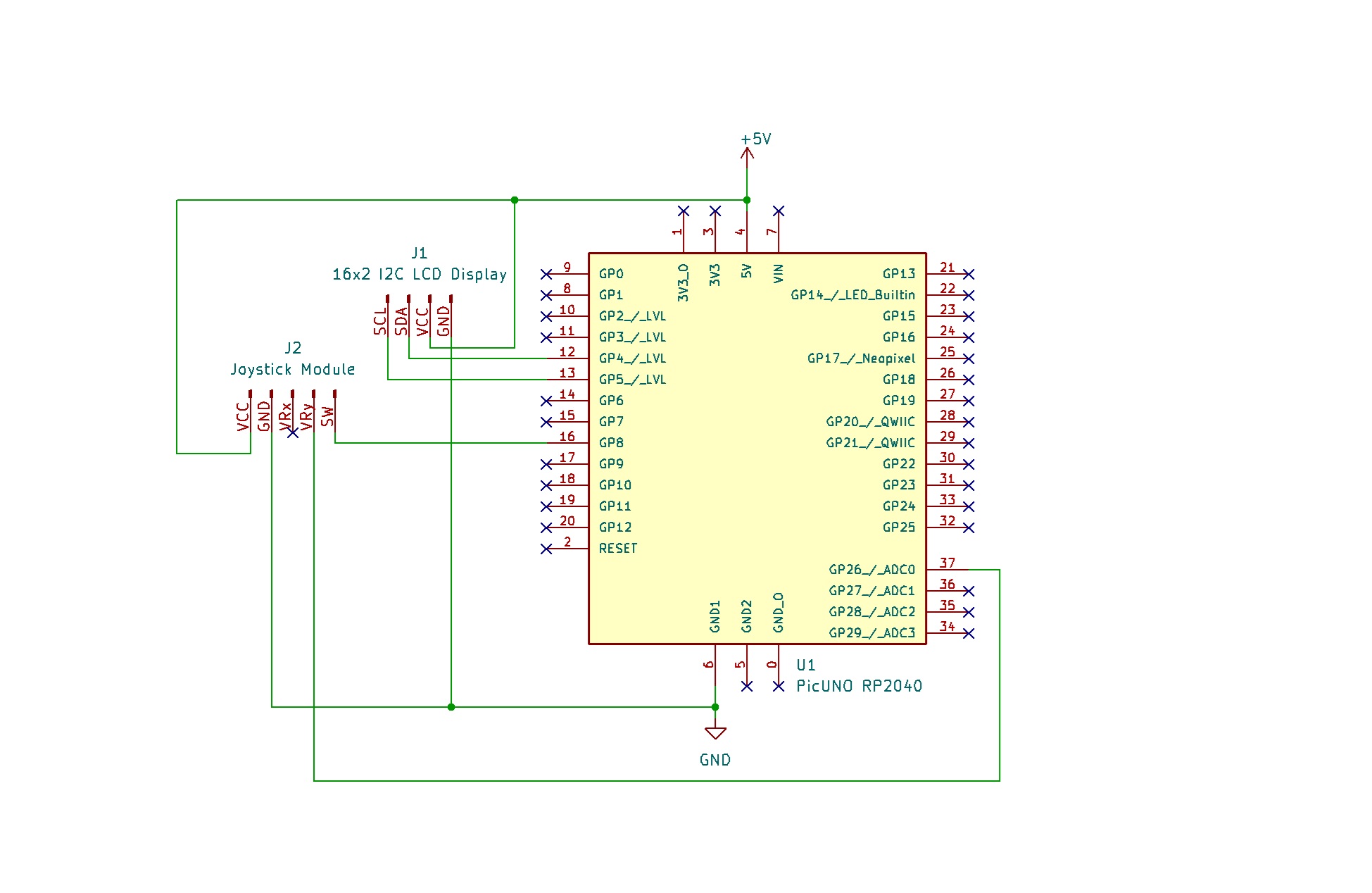
- Connect the positive terminal of the 4xAA Battery Pack to the Common VCC on breadboard to create constant 5V supply for longer time.
- Connect the negative terminal of the 4xAA Battery Pack to Common GND on breadboard.
- Connect the LCD Module's GND pin to GND.
- Connect the LCD Module's VCC pin to common VCC.
- Connect the LCD Module's SDA pin GPIO 4 (SDA Pin on PICUNO).
- Connect the LCD Module's SCL pin GPIO 5 (SCL Pin on PICUNO).
- JOYSTICK MODULE:
- Connect the VCC pin to Common VCC.
- Connect the GND pin to GND.
- Connect the VRy pin to Analog Pin A1 (GPIO 26).
- Connect the SW (Switch) pin to GPIO 8.
SCHEMATIC:
LCD VCC → 5V
LCD GND → GND
LCD SDA → GPIO 4 (Board SDA Pin)
LCD SCL → GPIO 5 (Board SCL Pin)
Joystick Module:
VCC → 5V
GND → GND
VRy → A0
SW → GPIO 8
CODE -- C:
#include <Wire.h>
#include <LiquidCrystal_I2C.h>
#include <EEPROM.h>
// --- Setup ---
LiquidCrystal_I2C lcd(0x27, 16, 2);
const int JOY_Y_PIN = A0;
const int RESTART_BUTTON_PIN = 8;
// --- Custom Characters & Sprites ---
#define SPRITE_DINO_RUN1 0
#define SPRITE_DINO_RUN2 1
#define SPRITE_DINO_DEAD 2
#define SPRITE_CACTUS 3
#define SPRITE_BIRD 4
byte dino_run1_char[8] = {0b00111,0b00101,0b00110,0b10100,0b01110,0b01010,0b00110,0b00011};
byte dino_run2_char[8] = {0b00111,0b00101,0b00110,0b10100,0b01110,0b01010,0b00110,0b01010};
byte dino_dead_char[8] = {0b00111,0b00111,0b00110,0b10101,0b01110,0b11011,0b00000,0b00000};
byte cactus_char[8] = {0b00100,0b01110,0b11101,0b11111,0b00100,0b00100,0b00100,0b00100};
byte bird_char[8] = {0b00000,0b00110,0b01111,0b11011,0b00110,0b01100,0b00000,0b00000};
// --- Game Variables ---
int playerY = 1;
int score = 0;
bool gameOver = true;
unsigned long lastFrameTime = 0;
int frameCount = 0;
int gameSpeed = 100; // Faster speed
// --- Obstacle Variables ---
const int MAX_OBSTACLES = 4;
const int OBSTACLE_SPACING = 6;
int obstacleX[MAX_OBSTACLES];
int obstacleY[MAX_OBSTACLES];
void setup() {
pinMode(JOY_Y_PIN, INPUT);
pinMode(RESTART_BUTTON_PIN, INPUT_PULLUP);
lcd.init();
lcd.backlight();
// Load characters into memory
lcd.createChar(SPRITE_DINO_RUN1, dino_run1_char);
lcd.createChar(SPRITE_DINO_RUN2, dino_run2_char);
lcd.createChar(SPRITE_DINO_DEAD, dino_dead_char);
lcd.createChar(SPRITE_CACTUS, cactus_char);
lcd.createChar(SPRITE_BIRD, bird_char);
randomSeed(analogRead(A0));
EEPROM.begin(512); // Initialize EEPROM for RP2040
}
void resetGame() {
playerY = 1; gameOver = false; score = 0;
for (int i = 0; i < MAX_OBSTACLES; i++) obstacleX[i] = -1;
lastFrameTime = millis();
}
void drawGameState() {
lcd.clear();
// Draw Player
lcd.setCursor(1, playerY);
lcd.write(frameCount % 4 < 2 ? SPRITE_DINO_RUN1 : SPRITE_DINO_RUN2);
// Draw Obstacles
for (int i = 0; i < MAX_OBSTACLES; i++) {
if (obstacleX[i] >= 0) {
lcd.setCursor(obstacleX[i], obstacleY[i]);
lcd.write(obstacleY[i] == 0 ? SPRITE_BIRD : SPRITE_CACTUS);
}
}
// Draw Score
lcd.setCursor(10, 0);
lcd.print("S:");
lcd.print(score);
}
void loop() {
if (gameOver) {
int highscore = 0;
EEPROM.get(0, highscore);
lcd.clear();
lcd.print("Chrome Dino Game");
lcd.setCursor(0, 1);
lcd.print("Best:");
lcd.print(highscore);
lcd.print(" Press");
while(digitalRead(RESTART_BUTTON_PIN) == HIGH) { /* Wait */ }
while(digitalRead(RESTART_BUTTON_PIN) == LOW) { /* Wait for release */ }
resetGame();
return;
}
if (millis() - lastFrameTime < gameSpeed) return;
lastFrameTime = millis();
frameCount++;
int yValue = analogRead(JOY_Y_PIN);
if (yValue < 300) playerY = 0;
else if (yValue > 700) playerY = 1;
for (int i = 0; i < MAX_OBSTACLES; i++) {
if (obstacleX[i] >= 0) {
obstacleX[i]--;
if (obstacleX[i] < 0) score++;
}
}
bool canSpawn = true;
for (int x : obstacleX) {
if (x > (15 - OBSTACLE_SPACING)) canSpawn = false;
}
if (canSpawn) {
for (int i = 0; i < MAX_OBSTACLES; i++) {
if (obstacleX[i] < 0) {
if (random(0, 6) == 0) {
obstacleX[i] = 15;
obstacleY[i] = random(0, 2);
}
break;
}
}
}
for (int i = 0; i < MAX_OBSTACLES; i++) {
if (obstacleX[i] == 1 && obstacleY[i] == playerY) {
gameOver = true;
}
}
drawGameState();
// --- Handle Game Over ---
if (gameOver) {
int highscore = 0;
EEPROM.get(0, highscore);
if (score > highscore) {
EEPROM.put(0, score);
EEPROM.commit();
}
lcd.clear();
lcd.setCursor(1, 1);
lcd.write(SPRITE_DINO_DEAD);
lcd.setCursor(4, 0);
lcd.print("GAME OVER");
delay(1500);
EEPROM.get(0, highscore);
lcd.clear();
lcd.print("Score: "); lcd.print(score);
lcd.setCursor(0, 1);
lcd.print("Best: "); lcd.print(highscore);
delay(2000);
}
}
#include <LiquidCrystal_I2C.h>
#include <EEPROM.h>
// --- Setup ---
LiquidCrystal_I2C lcd(0x27, 16, 2);
const int JOY_Y_PIN = A0;
const int RESTART_BUTTON_PIN = 8;
// --- Custom Characters & Sprites ---
#define SPRITE_DINO_RUN1 0
#define SPRITE_DINO_RUN2 1
#define SPRITE_DINO_DEAD 2
#define SPRITE_CACTUS 3
#define SPRITE_BIRD 4
byte dino_run1_char[8] = {0b00111,0b00101,0b00110,0b10100,0b01110,0b01010,0b00110,0b00011};
byte dino_run2_char[8] = {0b00111,0b00101,0b00110,0b10100,0b01110,0b01010,0b00110,0b01010};
byte dino_dead_char[8] = {0b00111,0b00111,0b00110,0b10101,0b01110,0b11011,0b00000,0b00000};
byte cactus_char[8] = {0b00100,0b01110,0b11101,0b11111,0b00100,0b00100,0b00100,0b00100};
byte bird_char[8] = {0b00000,0b00110,0b01111,0b11011,0b00110,0b01100,0b00000,0b00000};
// --- Game Variables ---
int playerY = 1;
int score = 0;
bool gameOver = true;
unsigned long lastFrameTime = 0;
int frameCount = 0;
int gameSpeed = 100; // Faster speed
// --- Obstacle Variables ---
const int MAX_OBSTACLES = 4;
const int OBSTACLE_SPACING = 6;
int obstacleX[MAX_OBSTACLES];
int obstacleY[MAX_OBSTACLES];
void setup() {
pinMode(JOY_Y_PIN, INPUT);
pinMode(RESTART_BUTTON_PIN, INPUT_PULLUP);
lcd.init();
lcd.backlight();
// Load characters into memory
lcd.createChar(SPRITE_DINO_RUN1, dino_run1_char);
lcd.createChar(SPRITE_DINO_RUN2, dino_run2_char);
lcd.createChar(SPRITE_DINO_DEAD, dino_dead_char);
lcd.createChar(SPRITE_CACTUS, cactus_char);
lcd.createChar(SPRITE_BIRD, bird_char);
randomSeed(analogRead(A0));
EEPROM.begin(512); // Initialize EEPROM for RP2040
}
void resetGame() {
playerY = 1; gameOver = false; score = 0;
for (int i = 0; i < MAX_OBSTACLES; i++) obstacleX[i] = -1;
lastFrameTime = millis();
}
void drawGameState() {
lcd.clear();
// Draw Player
lcd.setCursor(1, playerY);
lcd.write(frameCount % 4 < 2 ? SPRITE_DINO_RUN1 : SPRITE_DINO_RUN2);
// Draw Obstacles
for (int i = 0; i < MAX_OBSTACLES; i++) {
if (obstacleX[i] >= 0) {
lcd.setCursor(obstacleX[i], obstacleY[i]);
lcd.write(obstacleY[i] == 0 ? SPRITE_BIRD : SPRITE_CACTUS);
}
}
// Draw Score
lcd.setCursor(10, 0);
lcd.print("S:");
lcd.print(score);
}
void loop() {
if (gameOver) {
int highscore = 0;
EEPROM.get(0, highscore);
lcd.clear();
lcd.print("Chrome Dino Game");
lcd.setCursor(0, 1);
lcd.print("Best:");
lcd.print(highscore);
lcd.print(" Press");
while(digitalRead(RESTART_BUTTON_PIN) == HIGH) { /* Wait */ }
while(digitalRead(RESTART_BUTTON_PIN) == LOW) { /* Wait for release */ }
resetGame();
return;
}
if (millis() - lastFrameTime < gameSpeed) return;
lastFrameTime = millis();
frameCount++;
int yValue = analogRead(JOY_Y_PIN);
if (yValue < 300) playerY = 0;
else if (yValue > 700) playerY = 1;
for (int i = 0; i < MAX_OBSTACLES; i++) {
if (obstacleX[i] >= 0) {
obstacleX[i]--;
if (obstacleX[i] < 0) score++;
}
}
bool canSpawn = true;
for (int x : obstacleX) {
if (x > (15 - OBSTACLE_SPACING)) canSpawn = false;
}
if (canSpawn) {
for (int i = 0; i < MAX_OBSTACLES; i++) {
if (obstacleX[i] < 0) {
if (random(0, 6) == 0) {
obstacleX[i] = 15;
obstacleY[i] = random(0, 2);
}
break;
}
}
}
for (int i = 0; i < MAX_OBSTACLES; i++) {
if (obstacleX[i] == 1 && obstacleY[i] == playerY) {
gameOver = true;
}
}
drawGameState();
// --- Handle Game Over ---
if (gameOver) {
int highscore = 0;
EEPROM.get(0, highscore);
if (score > highscore) {
EEPROM.put(0, score);
EEPROM.commit();
}
lcd.clear();
lcd.setCursor(1, 1);
lcd.write(SPRITE_DINO_DEAD);
lcd.setCursor(4, 0);
lcd.print("GAME OVER");
delay(1500);
EEPROM.get(0, highscore);
lcd.clear();
lcd.print("Score: "); lcd.print(score);
lcd.setCursor(0, 1);
lcd.print("Best: "); lcd.print(highscore);
delay(2000);
}
}
Custom Characters - The code defines pixel patterns for the running animation, a dead dino, a cactus, and a bird. lcd.createChar() loads them into the LCD's memory.
Game Loop - The if (millis() - lastFrameTime < gameSpeed) logic creates a consistent frame rate, making the game speed adjustable and playable.
Joystick Control - analogRead(JOY_Y_PIN) reads the joystick's vertical position and sets the player's row (playerY) accordingly.
Random Obstacles - The code randomly spawns either a high obstacle (bird) or a low obstacle (cactus) at random intervals.
Collision & Scoring - The code checks if the player's coordinates match any obstacle's coordinates. It also increments the score when an obstacle is successfully passed.
High Score - The EEPROM.h library is used to get() the high score from memory at the end of a game. If the new score is higher, it is saved with EEPROM.put() and then permanently committed to flash memory with EEPROM.commit().
Game Loop - The if (millis() - lastFrameTime < gameSpeed) logic creates a consistent frame rate, making the game speed adjustable and playable.
Joystick Control - analogRead(JOY_Y_PIN) reads the joystick's vertical position and sets the player's row (playerY) accordingly.
Random Obstacles - The code randomly spawns either a high obstacle (bird) or a low obstacle (cactus) at random intervals.
Collision & Scoring - The code checks if the player's coordinates match any obstacle's coordinates. It also increments the score when an obstacle is successfully passed.
High Score - The EEPROM.h library is used to get() the high score from memory at the end of a game. If the new score is higher, it is saved with EEPROM.put() and then permanently committed to flash memory with EEPROM.commit().
CODE -- PYTHON:
from machine import Pin, ADC, I2C
from i2c_lcd import I2cLcd
from time import sleep_ms, ticks_ms, ticks_diff
import random
i2c = I2C(0, scl=Pin(5), sda=Pin(4))
lcd = I2cLcd(i2c, 0x27, 2, 16)
button = Pin(8, Pin.IN, Pin.PULL_UP)
adc_y = ADC(Pin(26))
# Define Custom Characters
dino_run1_char = bytearray([0b00111,0b00101,0b00110,0b10100,0b01110,0b01010,0b00110,0b00011])
dino_run2_char = bytearray([0b00111,0b00101,0b00110,0b10100,0b01110,0b01010,0b00110,0b01010])
dino_dead_char = bytearray([0b00111,0b00111,0b00110,0b10101,0b01110,0b11011,0b00000,0b00000])
cactus_char = bytearray([0b00100,0b01110,0b11101,0b11111,0b00100,0b00100,0b00100,0b00100])
bird_char = bytearray([0b00000,0b00110,0b01111,0b11011,0b00110,0b01100,0b00000,0b00000])
lcd.create_char(0, dino_run1_char); lcd.create_char(1, dino_run2_char)
lcd.create_char(2, dino_dead_char); lcd.create_char(3, cactus_char); lcd.create_char(4, bird_char)
def read_highscore():
try:
with open('highscore.txt', 'r') as f: return int(f.read())
except (OSError, ValueError): return 0
def write_highscore(new_score):
try:
with open('highscore.txt', 'w') as f: f.write(str(new_score))
except OSError: print("Failed to save high score.")
# Game Variables
MAX_OBSTACLES = 4; OBSTACLE_SPACING = 6; game_speed_ms = 100
while True:
highscore = read_highscore(); lcd.clear(); lcd.putstr("Chrome Dino Game")
lcd.move_to(0, 1); lcd.putstr(f"Best:{highscore} Press")
while button.value() == 1: sleep_ms(20)
while button.value() == 0: sleep_ms(20)
# Reset Game
player_y = 1; game_over = False; score = 0; frame_count = 0
obstacle_x = [-1] * MAX_OBSTACLES; obstacle_y = [-1] * MAX_OBSTACLES
last_frame_time = ticks_ms()
# Main Game Loop
while not game_over:
if ticks_diff(ticks_ms(), last_frame_time) < game_speed_ms: continue
last_frame_time = ticks_ms(); frame_count += 1
y_val = adc_y.read_u16()
if y_val < 20000: player_y = 0
elif y_val > 45000: player_y = 1
# Move obstacles & spawn new ones
for i in range(MAX_OBSTACLES):
if obstacle_x[i] >= 0: obstacle_x[i] -= 1
if obstacle_x[i] < 0: score += 1
can_spawn = all(x <= (15 - OBSTACLE_SPACING) for x in obstacle_x)
if can_spawn and random.randint(0, 5) == 0:
for i in range(MAX_OBSTACLES):
if obstacle_x[i] < 0: obstacle_x[i] = 15; obstacle_y[i] = random.randint(0, 1); break
# Collision detection
for i in range(MAX_OBSTACLES):
if obstacle_x[i] == 1 and obstacle_y[i] == player_y: game_over = True; break
# Draw everything
lcd.clear()
player_sprite = chr(0 if frame_count % 2 == 0 else 1)
lcd.move_to(1, player_y); lcd.putstr(player_sprite)
for i in range(MAX_OBSTACLES):
if obstacle_x[i] >= 0:
sprite = chr(4 if obstacle_y[i] == 0 else 3)
lcd.move_to(obstacle_x[i], obstacle_y[i]); lcd.putstr(sprite)
lcd.move_to(10, 0); lcd.putstr(f"S:{score}")
# Game Over
highscore = read_highscore()
if score > highscore: write_highscore(score); highscore = score
lcd.clear(); lcd.move_to(1,1); lcd.putstr(chr(2))
lcd.move_to(4, 0); lcd.putstr("GAME OVER"); sleep_ms(1500)
lcd.clear(); lcd.putstr(f"Score: {score}")
lcd.move_to(0,1); lcd.putstr(f"Best: {highscore}"); sleep_ms(2000)
from i2c_lcd import I2cLcd
from time import sleep_ms, ticks_ms, ticks_diff
import random
i2c = I2C(0, scl=Pin(5), sda=Pin(4))
lcd = I2cLcd(i2c, 0x27, 2, 16)
button = Pin(8, Pin.IN, Pin.PULL_UP)
adc_y = ADC(Pin(26))
# Define Custom Characters
dino_run1_char = bytearray([0b00111,0b00101,0b00110,0b10100,0b01110,0b01010,0b00110,0b00011])
dino_run2_char = bytearray([0b00111,0b00101,0b00110,0b10100,0b01110,0b01010,0b00110,0b01010])
dino_dead_char = bytearray([0b00111,0b00111,0b00110,0b10101,0b01110,0b11011,0b00000,0b00000])
cactus_char = bytearray([0b00100,0b01110,0b11101,0b11111,0b00100,0b00100,0b00100,0b00100])
bird_char = bytearray([0b00000,0b00110,0b01111,0b11011,0b00110,0b01100,0b00000,0b00000])
lcd.create_char(0, dino_run1_char); lcd.create_char(1, dino_run2_char)
lcd.create_char(2, dino_dead_char); lcd.create_char(3, cactus_char); lcd.create_char(4, bird_char)
def read_highscore():
try:
with open('highscore.txt', 'r') as f: return int(f.read())
except (OSError, ValueError): return 0
def write_highscore(new_score):
try:
with open('highscore.txt', 'w') as f: f.write(str(new_score))
except OSError: print("Failed to save high score.")
# Game Variables
MAX_OBSTACLES = 4; OBSTACLE_SPACING = 6; game_speed_ms = 100
while True:
highscore = read_highscore(); lcd.clear(); lcd.putstr("Chrome Dino Game")
lcd.move_to(0, 1); lcd.putstr(f"Best:{highscore} Press")
while button.value() == 1: sleep_ms(20)
while button.value() == 0: sleep_ms(20)
# Reset Game
player_y = 1; game_over = False; score = 0; frame_count = 0
obstacle_x = [-1] * MAX_OBSTACLES; obstacle_y = [-1] * MAX_OBSTACLES
last_frame_time = ticks_ms()
# Main Game Loop
while not game_over:
if ticks_diff(ticks_ms(), last_frame_time) < game_speed_ms: continue
last_frame_time = ticks_ms(); frame_count += 1
y_val = adc_y.read_u16()
if y_val < 20000: player_y = 0
elif y_val > 45000: player_y = 1
# Move obstacles & spawn new ones
for i in range(MAX_OBSTACLES):
if obstacle_x[i] >= 0: obstacle_x[i] -= 1
if obstacle_x[i] < 0: score += 1
can_spawn = all(x <= (15 - OBSTACLE_SPACING) for x in obstacle_x)
if can_spawn and random.randint(0, 5) == 0:
for i in range(MAX_OBSTACLES):
if obstacle_x[i] < 0: obstacle_x[i] = 15; obstacle_y[i] = random.randint(0, 1); break
# Collision detection
for i in range(MAX_OBSTACLES):
if obstacle_x[i] == 1 and obstacle_y[i] == player_y: game_over = True; break
# Draw everything
lcd.clear()
player_sprite = chr(0 if frame_count % 2 == 0 else 1)
lcd.move_to(1, player_y); lcd.putstr(player_sprite)
for i in range(MAX_OBSTACLES):
if obstacle_x[i] >= 0:
sprite = chr(4 if obstacle_y[i] == 0 else 3)
lcd.move_to(obstacle_x[i], obstacle_y[i]); lcd.putstr(sprite)
lcd.move_to(10, 0); lcd.putstr(f"S:{score}")
# Game Over
highscore = read_highscore()
if score > highscore: write_highscore(score); highscore = score
lcd.clear(); lcd.move_to(1,1); lcd.putstr(chr(2))
lcd.move_to(4, 0); lcd.putstr("GAME OVER"); sleep_ms(1500)
lcd.clear(); lcd.putstr(f"Score: {score}")
lcd.move_to(0,1); lcd.putstr(f"Best: {highscore}"); sleep_ms(2000)
Custom Characters - The code defines pixel patterns for the running dinosaur animation, a dead dino, a cactus, and a bird, then loads them into the LCD's memory using lcd.create_char().
Game Loop - The ticks_diff() logic creates a consistent frame rate, controlled by game_speed_ms, making the game's difficulty stable and adjustable.
Joystick Control - adc_y.read_u16() reads the joystick's vertical position. The code checks if this value is above or below certain thresholds to move the player to the top or bottom row.
Random Obstacles - The game randomly spawns either a high obstacle (bird) or a low obstacle (cactus) at random intervals, making each playthrough unique.
Collision & Scoring - The code checks if the player's coordinates match any obstacle's coordinates. It also increments the score when an obstacle is successfully passed.
High Score - The read_highscore() and write_highscore() functions handle reading and writing the best score to a file (highscore.txt) in the board's internal flash memory, making it persistent between games.
Game Loop - The ticks_diff() logic creates a consistent frame rate, controlled by game_speed_ms, making the game's difficulty stable and adjustable.
Joystick Control - adc_y.read_u16() reads the joystick's vertical position. The code checks if this value is above or below certain thresholds to move the player to the top or bottom row.
Random Obstacles - The game randomly spawns either a high obstacle (bird) or a low obstacle (cactus) at random intervals, making each playthrough unique.
Collision & Scoring - The code checks if the player's coordinates match any obstacle's coordinates. It also increments the score when an obstacle is successfully passed.
High Score - The read_highscore() and write_highscore() functions handle reading and writing the best score to a file (highscore.txt) in the board's internal flash memory, making it persistent between games.