Sound Level Meter Using Microphone Sound Sensor And LED Bar Graph
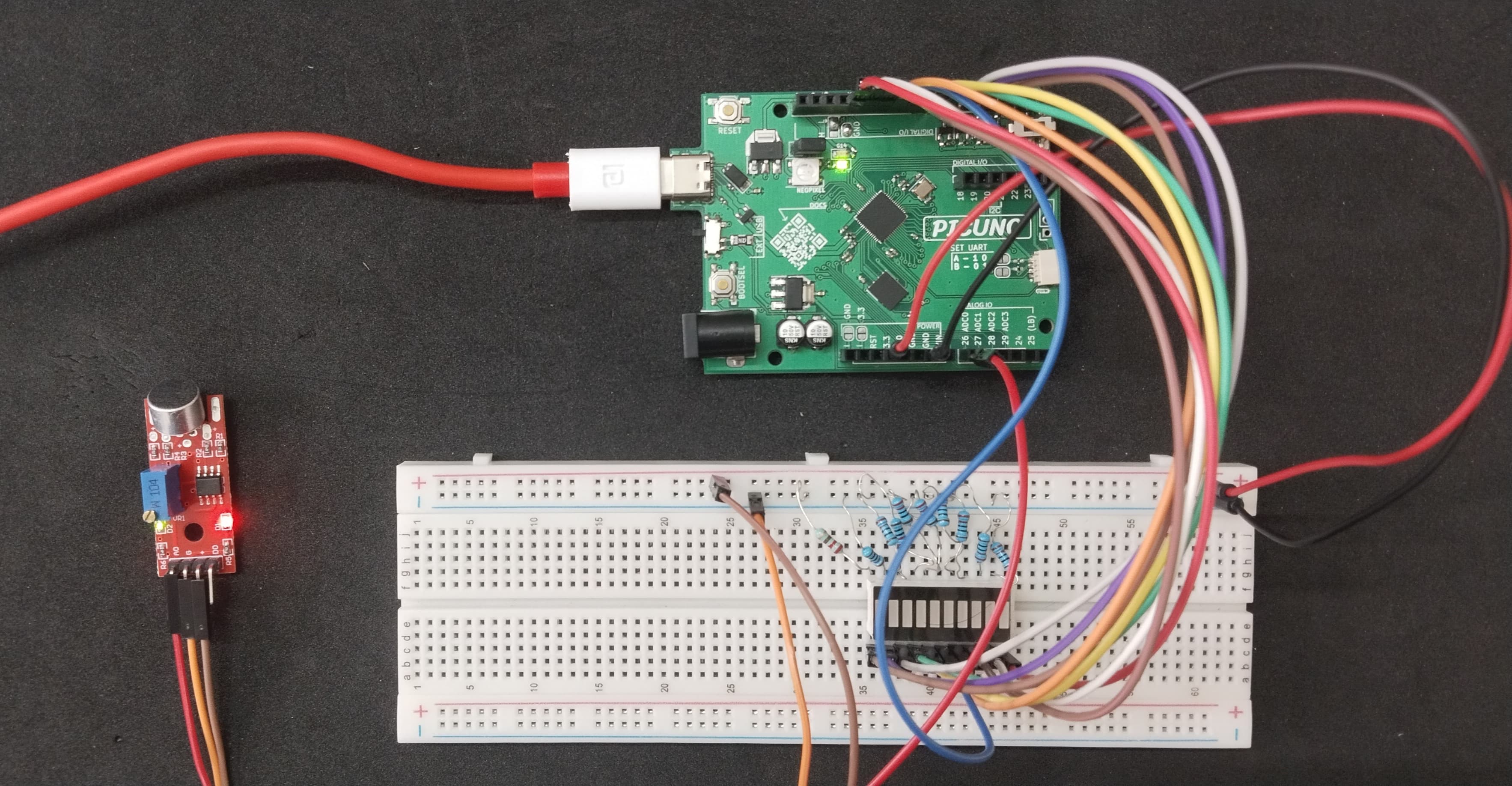
HARDWARE REQUIRED:
- PICUNO Microcontroller board
- 1 × LED Bar Graph Display (Common Cathode)
- 1 × Microphone Sound Sensor Module
- 10 × 220Ω resistors (Current limiting for LEDs)
- Jumper wires
- USB cable
DESCRIPTION:
This project uses a microphone sound sensor to measure the ambient sound level and display it as a live bar graph on a 10-segment LED display. The analog value from the sound sensor is read and processed to determine the volume, which is then mapped to a value between 0 and 10 to represent the number of LEDs to light up. This creates a real-time VU (Volume Unit) meter.
NOTE: For some sound modules, the potentiometer must be adjusted first. Before uploading the final code, use a simple Analog read sketch to view the sensor's output. In a quiet room, turn the potentiometer until the value is stable around the ideal midpoint (~512 for C/Arduino, ~32768 for MicroPython). This step centres the signal and is essential for the project to work correctly.
NOTE: For some sound modules, the potentiometer must be adjusted first. Before uploading the final code, use a simple Analog read sketch to view the sensor's output. In a quiet room, turn the potentiometer until the value is stable around the ideal midpoint (~512 for C/Arduino, ~32768 for MicroPython). This step centres the signal and is essential for the project to work correctly.
CIRCUIT DIAGRAM:

- Connect the PICUNO board to the computer using a USB cable.
- Connect each LED anode from 1-10 to GPIO 4 to 13 using 220Ω resistors.
- Connect all LED cathodes to GND through 220Ω resistors.
- Connect the sound sensor's VCC (or +) and GND pins to 3.3V and GND pins.
- Connect the sensor's Analog Output (AO) pin to the Analog pin A0 (GPIO 26).
SCHEMATIC:
LED 1 anode → GPIO 4
LED 2 anode → GPIO 5
LED 3 anode → GPIO 6
LED 4 anode → GPIO 7
LED 5 anode → GPIO 8
LED 6 anode → GPIO 9
LED 7 anode → GPIO 10
LED 8 anode → GPIO 11
LED 9 anode → GPIO 12
LED 10 anode → GPIO 13
All LEDs cathode → 220Ω resistor → GND
Sound Sensor + / VCC → 3.3V
Sound Sensor G / GND → GND
Sound Sensor AO → A0
CODE -- C:
const int ledPins[10] = {4, 5, 6, 7, 8, 9, 10, 11, 12, 13};
const int sensorPin = A0;
// CALIBRATION: Adjust for sensitivity. Lower value = more sensitive.
const int SENSITIVITY = 400;
void setup() {
for (int i = 0; i < 10; i++) {
pinMode(ledPins[i], OUTPUT);
digitalWrite(ledPins[i], LOW);
}
}
void loop() {
int sampleWindow = 50;
unsigned long startMillis = millis();
unsigned int signalMax = 0;
unsigned int signalMin = 1023;
while (millis() - startMillis < sampleWindow) {
int sample = analogRead(sensorPin);
if (sample > signalMax) signalMax = sample;
if (sample < signalMin) signalMin = sample;
}
int peakToPeak = signalMax - signalMin;
int level = map(peakToPeak, 0, SENSITIVITY, 0, 10);
for (int i = 0; i < 10; i++) {
if (i < level)
digitalWrite(ledPins[i], HIGH);
else
digitalWrite(ledPins[i], LOW);
}
}
const int sensorPin = A0;
// CALIBRATION: Adjust for sensitivity. Lower value = more sensitive.
const int SENSITIVITY = 400;
void setup() {
for (int i = 0; i < 10; i++) {
pinMode(ledPins[i], OUTPUT);
digitalWrite(ledPins[i], LOW);
}
}
void loop() {
int sampleWindow = 50;
unsigned long startMillis = millis();
unsigned int signalMax = 0;
unsigned int signalMin = 1023;
while (millis() - startMillis < sampleWindow) {
int sample = analogRead(sensorPin);
if (sample > signalMax) signalMax = sample;
if (sample < signalMin) signalMin = sample;
}
int peakToPeak = signalMax - signalMin;
int level = map(peakToPeak, 0, SENSITIVITY, 0, 10);
for (int i = 0; i < 10; i++) {
if (i < level)
digitalWrite(ledPins[i], HIGH);
else
digitalWrite(ledPins[i], LOW);
}
}
const int SENSITIVITY = 400; - Sets the meter's sensitivity. A higher value makes it less sensitive.
while (millis() - startMillis < sampleWindow) - Samples the microphone for 50ms to find the loudest and quietest points of the sound wave.
int peakToPeak = signalMax - signalMin; - Calculates the sound's volume by measuring the signal's amplitude.
int level = map(peakToPeak, 0, SENSITIVITY, 0, 10); - Scales the calculated volume to a level from 0 to 10 for the bar graph.
while (millis() - startMillis < sampleWindow) - Samples the microphone for 50ms to find the loudest and quietest points of the sound wave.
int peakToPeak = signalMax - signalMin; - Calculates the sound's volume by measuring the signal's amplitude.
int level = map(peakToPeak, 0, SENSITIVITY, 0, 10); - Scales the calculated volume to a level from 0 to 10 for the bar graph.
CODE -- PYTHON:
from machine import Pin, ADC
import time
led_pins = [Pin(i, Pin.OUT) for i in range(4, 14)]
sensor = ADC(Pin(26))
# Lower value = more sensitive. Higher value = less sensitive.
# You will need to adjust this for best results.
SENSITIVITY = 20000
def update_leds(level):
"""Turns on LEDs up to the specified level (0-10)."""
for i in range(10):
if i < level:
led_pins[i].value(1) # Turn LED ON
else:
led_pins[i].value(0) # Turn LED OFF
while True:
sample_window_ms = 50
start_time = time.ticks_ms()
signal_max = 0
signal_min = 65535
while time.ticks_diff(time.ticks_ms(), start_time) < sample_window_ms:
sample = sensor.read_u16()
if sample > signal_max:
signal_max = sample
if sample < signal_min:
signal_min = sample
peak_to_peak = signal_max - signal_min
clamped_value = max(0, min(peak_to_peak, SENSITIVITY))
num_leds_to_light = int((clamped_value / SENSITIVITY) * 10)
update_leds(num_leds_to_light)
import time
led_pins = [Pin(i, Pin.OUT) for i in range(4, 14)]
sensor = ADC(Pin(26))
# Lower value = more sensitive. Higher value = less sensitive.
# You will need to adjust this for best results.
SENSITIVITY = 20000
def update_leds(level):
"""Turns on LEDs up to the specified level (0-10)."""
for i in range(10):
if i < level:
led_pins[i].value(1) # Turn LED ON
else:
led_pins[i].value(0) # Turn LED OFF
while True:
sample_window_ms = 50
start_time = time.ticks_ms()
signal_max = 0
signal_min = 65535
while time.ticks_diff(time.ticks_ms(), start_time) < sample_window_ms:
sample = sensor.read_u16()
if sample > signal_max:
signal_max = sample
if sample < signal_min:
signal_min = sample
peak_to_peak = signal_max - signal_min
clamped_value = max(0, min(peak_to_peak, SENSITIVITY))
num_leds_to_light = int((clamped_value / SENSITIVITY) * 10)
update_leds(num_leds_to_light)
SENSITIVITY = 20000 - Sets the meter's sensitivity. Adjust this value to calibrate the display's responsiveness.
while time.ticks_diff(...) < sample_window_ms - Samples the microphone for 50ms to find the signal's peak range.
peak_to_peak = signal_max - signal_min - Calculates the sound's volume by measuring its amplitude.
level = int((clamped_value / SENSITIVITY) * 10) - Scales the measured volume to a 0-10 level for the bar graph display.
while time.ticks_diff(...) < sample_window_ms - Samples the microphone for 50ms to find the signal's peak range.
peak_to_peak = signal_max - signal_min - Calculates the sound's volume by measuring its amplitude.
level = int((clamped_value / SENSITIVITY) * 10) - Scales the measured volume to a 0-10 level for the bar graph display.