Water Level Indicator With LCD Display
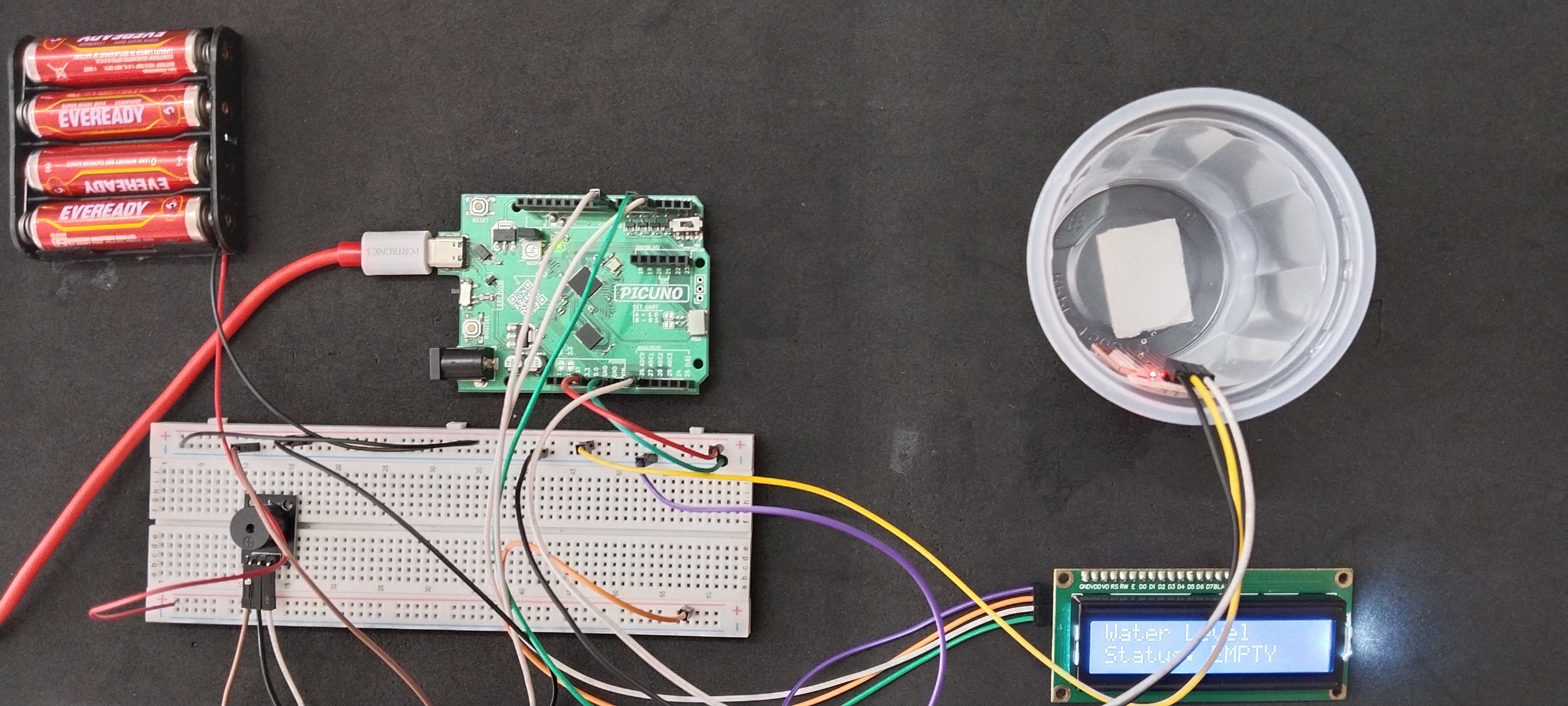
HARDWARE REQUIRED:
- PICUNO Microcontroller board
- 1 × 16x2 I2C LCD Display
- 1 × HW-038 Water Level Sensor
- Jumper wires
- USB cable
- 1 × 4xAA Battery pack (for external power supply)
DESCRIPTION:
This project creates a smart water level indicator for a container. It uses a water level sensor to measure how submerged it is and reports the status on an I2C LCD screen. When the tank is at a low level, the display reads "Status: EMPTY". When the water reaches a medium level, it changes to "Status: MEDIUM". When the tank is full and at risk of overflowing, the display reads "Status: FULL!" and a buzzer sounds a continuous alarm.
LIBRARIES REQUIRED:
For C / Arduino IDE:
Wire.h: Manages I2C communication (usually included by default).
LiquidCrystal_I2C.h: The driver library for the I2C LCD module.
For Micropython / Thonny IDE:
i2c_lcd.py: The custom library file saved to the PICUNO board.
The code also uses the built-in machine and time modules.
LIBRARIES REQUIRED:
For C / Arduino IDE:
Wire.h: Manages I2C communication (usually included by default).
LiquidCrystal_I2C.h: The driver library for the I2C LCD module.
For Micropython / Thonny IDE:
i2c_lcd.py: The custom library file saved to the PICUNO board.
The code also uses the built-in machine and time modules.
CIRCUIT DIAGRAM:
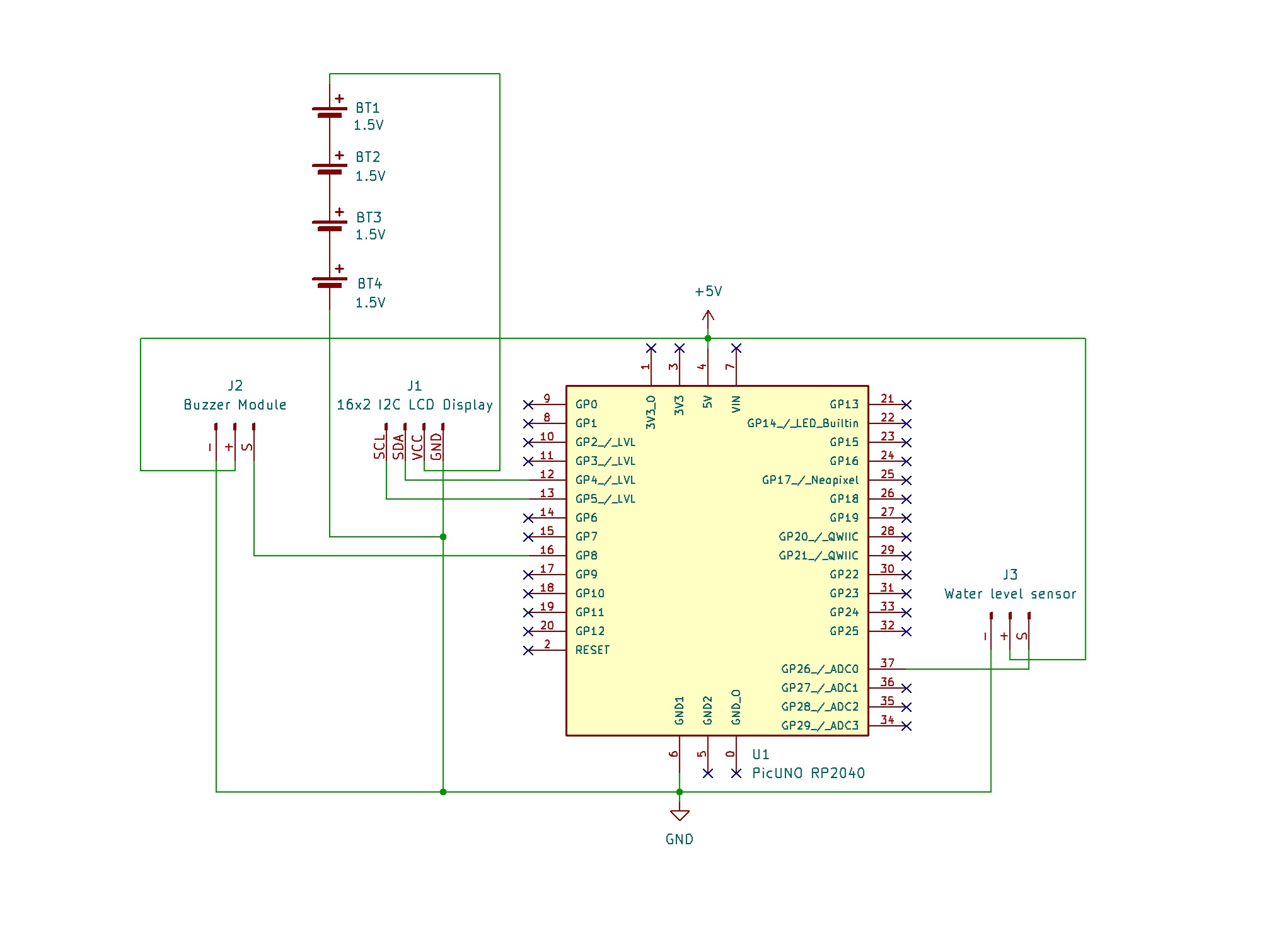
- Connect the LCD Module's GND pin to GND.
- Connect the LCD Module's VCC pin to the Positive (+) terminal of the 4xAA Battery Pack.
- Connect the LCD Module's SDA pin GPIO 4 (SDA Pin on PICUNO).
- Connect the LCD Module's SCL pin GPIO 5 (SCL Pin on PICUNO).
- Connect the negative terminal (-) of the 4xAA Battery Pack to Common GND on breadboard.
- Connect the VCC (+) pin to 5V pin on the board.
- Connect the GND (-) pin to GND pin on board.
- Connect the Signal (S) pin to Analog Pin A0 (GPIO 26).
- Connect the GND (-) pin to GND pin.
- Connect the VCC (+) pin to 5V.
- Connect the Signal (S) pin to GPIO 8.
SCHEMATIC:
16x2 I2C LCD Display:
LCD VCC → 4xAA Battery Pack (+)
LCD GND → GND
LCD SDA → GPIO 4 (Board SDA Pin)
LCD SCL → GPIO 5 (Board SCL Pin)
Water Level Sensor:
GND / (-) → GND
VCC / (+) → 5V
SIGNAL / (S) → A0 (GPIO 26)
Buzzer Module:
VCC / (+) → 5V
GND / (-) → GND
Signal (S) → GPIO 8
Common Ground Connection:
4xAA Battery Pack (-) → PICUNO Board GND
CODE -- C:
#include <Wire.h>
#include <LiquidCrystal_I2C.h>
const int SENSOR_PIN = A0;
const int BUZZER_PIN = 8;
// --- LCD Setup ---
LiquidCrystal_I2C lcd(0x27, 16, 2);
// --- Calibration Thresholds ---
const int MEDIUM_LEVEL = 200;
const int FULL_LEVEL = 400;
void setup() {
Serial.begin(9600);
pinMode(BUZZER_PIN, OUTPUT);
lcd.init();
lcd.backlight();
}
void loop() {
int waterLevel = analogRead(SENSOR_PIN);
Serial.print("Water Level Reading: ");
Serial.println(waterLevel);
lcd.clear();
lcd.setCursor(0, 0);
lcd.print("Water Level");
lcd.setCursor(0, 1);
if (waterLevel < MEDIUM_LEVEL) {
lcd.print("Status: EMPTY ");
noTone(BUZZER_PIN);
}
else if (waterLevel >= MEDIUM_LEVEL && waterLevel < FULL_LEVEL) {
lcd.print("Status: MEDIUM");
noTone(BUZZER_PIN);
}
else {
lcd.print("Status: FULL! ");
tone(BUZZER_PIN, 1500);
}
delay(200);
}
#include <LiquidCrystal_I2C.h>
const int SENSOR_PIN = A0;
const int BUZZER_PIN = 8;
// --- LCD Setup ---
LiquidCrystal_I2C lcd(0x27, 16, 2);
// --- Calibration Thresholds ---
const int MEDIUM_LEVEL = 200;
const int FULL_LEVEL = 400;
void setup() {
Serial.begin(9600);
pinMode(BUZZER_PIN, OUTPUT);
lcd.init();
lcd.backlight();
}
void loop() {
int waterLevel = analogRead(SENSOR_PIN);
Serial.print("Water Level Reading: ");
Serial.println(waterLevel);
lcd.clear();
lcd.setCursor(0, 0);
lcd.print("Water Level");
lcd.setCursor(0, 1);
if (waterLevel < MEDIUM_LEVEL) {
lcd.print("Status: EMPTY ");
noTone(BUZZER_PIN);
}
else if (waterLevel >= MEDIUM_LEVEL && waterLevel < FULL_LEVEL) {
lcd.print("Status: MEDIUM");
noTone(BUZZER_PIN);
}
else {
lcd.print("Status: FULL! ");
tone(BUZZER_PIN, 1500);
}
delay(200);
}
Thresholds - The MEDIUM_LEVEL and FULL_LEVEL variables define the trigger points for the different statuses.
lcd.print() - This command is used to display the current status text on the LCD screen.
if / else if / else Logic - This structure checks the waterLevel reading and selects the correct message to display.
lcd.print() - This command is used to display the current status text on the LCD screen.
if / else if / else Logic - This structure checks the waterLevel reading and selects the correct message to display.
CODE -- PYTHON:
from machine import Pin, ADC, PWM, I2C
from time import sleep
from i2c_lcd import I2cLcd
sensor = ADC(Pin(26))
buzzer = PWM(Pin(8))
i2c = I2C(0, scl=Pin(5), sda=Pin(4))
lcd = I2cLcd(i2c, 0x27, 2, 16)
# --- Calibration Thresholds ---
MEDIUM_LEVEL = 15000
FULL_LEVEL = 30000
# --- Main Loop ---
while True:
water_level = sensor.read_u16()
print(f"Water Level Reading: {water_level}")
lcd.clear()
lcd.putstr("Water Level")
lcd.move_to(0, 1)
if water_level < MEDIUM_LEVEL:
# EMPTY or LOW
lcd.putstr("Status: EMPTY ")
buzzer.duty_u16(0)
elif water_level >= MEDIUM_LEVEL and water_level < FULL_LEVEL:
# MEDIUM
lcd.putstr("Status: MEDIUM")
buzzer.duty_u16(0)
else:
# FULL / OVERFLOW
lcd.putstr("Status: FULL! ")
buzzer.freq(2500)
buzzer.duty_u16(32768)
sleep(0.2)
from time import sleep
from i2c_lcd import I2cLcd
sensor = ADC(Pin(26))
buzzer = PWM(Pin(8))
i2c = I2C(0, scl=Pin(5), sda=Pin(4))
lcd = I2cLcd(i2c, 0x27, 2, 16)
# --- Calibration Thresholds ---
MEDIUM_LEVEL = 15000
FULL_LEVEL = 30000
# --- Main Loop ---
while True:
water_level = sensor.read_u16()
print(f"Water Level Reading: {water_level}")
lcd.clear()
lcd.putstr("Water Level")
lcd.move_to(0, 1)
if water_level < MEDIUM_LEVEL:
# EMPTY or LOW
lcd.putstr("Status: EMPTY ")
buzzer.duty_u16(0)
elif water_level >= MEDIUM_LEVEL and water_level < FULL_LEVEL:
# MEDIUM
lcd.putstr("Status: MEDIUM")
buzzer.duty_u16(0)
else:
# FULL / OVERFLOW
lcd.putstr("Status: FULL! ")
buzzer.freq(2500)
buzzer.duty_u16(32768)
sleep(0.2)
Thresholds - These variables define the trigger points for the medium and full levels, using the 16-bit ADC range.
lcd.putstr() - This library command prints a string of text to the LCD at the current cursor position.
if / elif / else Logic - This structure is used to check the water_level reading and display the correct status message on the LCD.
lcd.putstr() - This library command prints a string of text to the LCD at the current cursor position.
if / elif / else Logic - This structure is used to check the water_level reading and display the correct status message on the LCD.