Digital Die With LCD Display
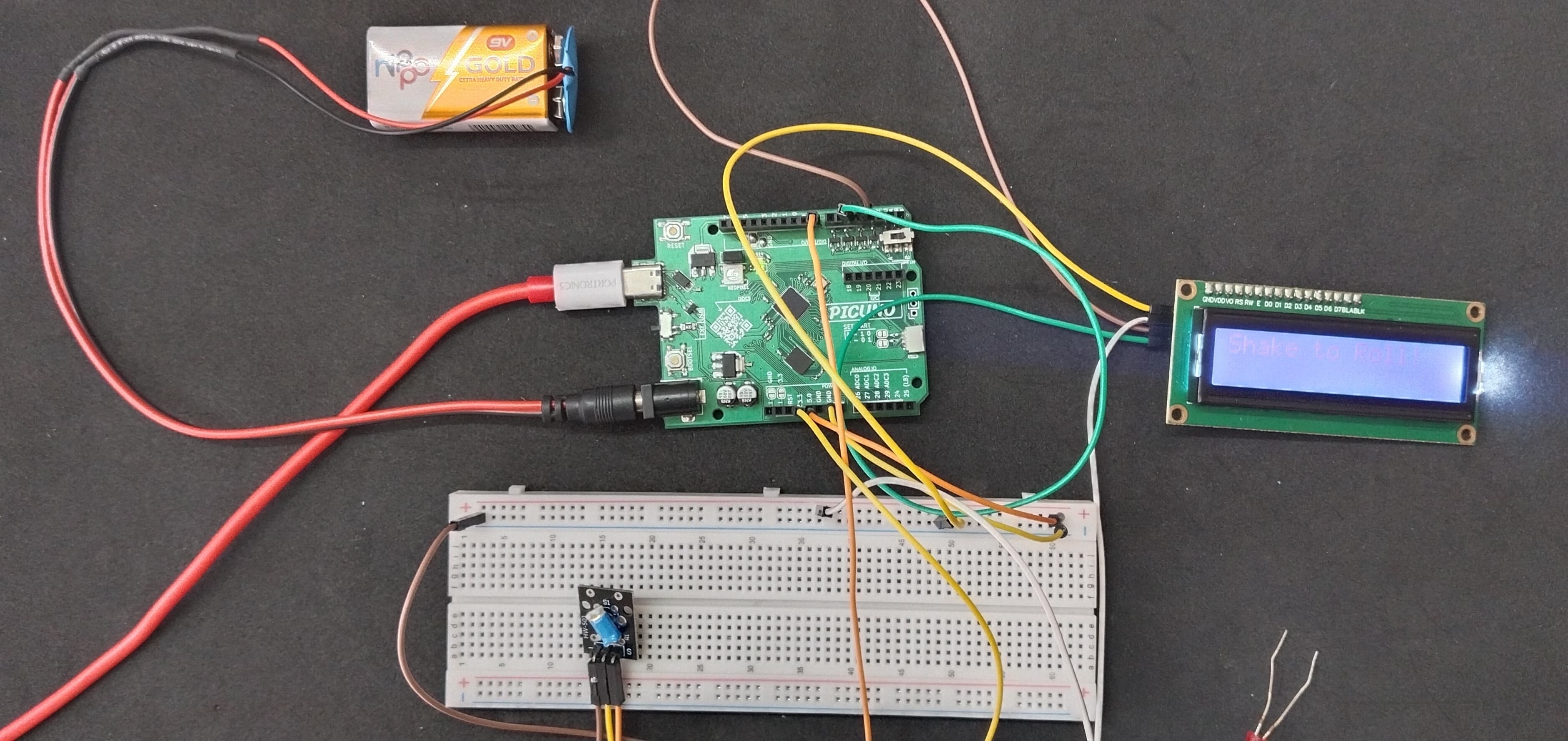
HARDWARE REQUIRED:
- PICUNO Microcontroller board
- 1 × 16x2 I2C LCD Display
- 1 × KY-020 Tilt Switch Sensor Module
- 9V Battery with a snap connector (to power the board via the DC Jack)
- Jumper wires
- USB cable
DESCRIPTION:
This project creates an interactive digital die. The system uses a tilt switch to detect when the device is shaken. Upon detecting a shake, the microcontroller generates a random number from 1 to 6 and displays the result on a 16x2 LCD screen (e.g., "You rolled a: 5"). After a two-second pause to allow the user to see the result, the screen automatically clears and resets to a "Shake to Roll!" message, making it ready for the next shake. This project is a fun introduction to using physical triggers to generate random events and display feedback.
CIRCUIT DIAGRAM:

- I2C LCD DISPLAY:
- Connect the LCD Module's GND pin to a GND pin on board.
- Connect the LCD Module's VCC pin to the 5V pin on board.
- Connect the LCD Module's SDA pin GPIO 4 (SDA Pin on PICUNO).
- Connect the LCD Module's SCL pin GPIO 5 (SCL Pin on PICUNO).
- KY-020 TILT SWITCH SENSOR MODULE:
- Connect the Sensor's GND pin to GND pin on board.
- Connect the Sensor's VCC pin to 3.3V on board.
- Connect the Sensor's Signal pin to GPIO 8.
SCHEMATIC:
LCD VCC → 5V
LCD GND → GND
LCD SDA → GPIO 4 (Board SDA Pin)
LCD SCL → GPIO 5 (Board SCL Pin)
TILT SWITCH SENSOR -ve terminal → GND
TILT SWITCH SENSOR +ve terminal → 3.3V
TILT SWITCH SENSOR Signal (S) → GPIO 8
CODE -- C:
#include <Wire.h>
#include <LiquidCrystal_I2C.h>
const int TILT_PIN = 8;
LiquidCrystal_I2C lcd(0x27, 16, 2);
bool lastTiltState = HIGH;
void setup() {
pinMode(TILT_PIN, INPUT_PULLUP);
lcd.init();
lcd.backlight();
randomSeed(analogRead(A1)); // Seed the random generator
lcd.print("Shake to Roll!");
}
void loop() {
bool currentTiltState = digitalRead(TILT_PIN);
// Detect when the switch is first tilted (a HIGH to LOW transition)
if (currentTiltState == LOW && lastTiltState == HIGH) {
// Generate a random number from 1 to 6
long dieRoll = random(1, 7);
// Display the result
lcd.clear();
lcd.setCursor(0, 0);
lcd.print("You rolled a:");
lcd.setCursor(7, 1);
lcd.print(dieRoll);
// Wait 2 seconds for the user to see the result
delay(2000);
// Now, reset the screen for the next roll
lcd.clear();
lcd.print("Shake to Roll!");
}
lastTiltState = currentTiltState;
}
#include <LiquidCrystal_I2C.h>
const int TILT_PIN = 8;
LiquidCrystal_I2C lcd(0x27, 16, 2);
bool lastTiltState = HIGH;
void setup() {
pinMode(TILT_PIN, INPUT_PULLUP);
lcd.init();
lcd.backlight();
randomSeed(analogRead(A1)); // Seed the random generator
lcd.print("Shake to Roll!");
}
void loop() {
bool currentTiltState = digitalRead(TILT_PIN);
// Detect when the switch is first tilted (a HIGH to LOW transition)
if (currentTiltState == LOW && lastTiltState == HIGH) {
// Generate a random number from 1 to 6
long dieRoll = random(1, 7);
// Display the result
lcd.clear();
lcd.setCursor(0, 0);
lcd.print("You rolled a:");
lcd.setCursor(7, 1);
lcd.print(dieRoll);
// Wait 2 seconds for the user to see the result
delay(2000);
// Now, reset the screen for the next roll
lcd.clear();
lcd.print("Shake to Roll!");
}
lastTiltState = currentTiltState;
}
randomSeed(analogRead(A1)); - This makes the random numbers more truly random by starting the sequence from an unpredictable point (the electrical noise on an unconnected analog pin).
if (currentTiltState == LOW && lastTiltState == HIGH) - This detects the exact moment the board is tilted, ensuring the code only runs once per shake.
long dieRoll = random(1, 7); - Generates a random integer between 1 and 6 (the upper number, 7, is not included).
delay(2000); ... lcd.clear(); ... - After displaying the result, the code waits for two seconds, then clears the screen and prints the welcome message again, ready for the next roll.
if (currentTiltState == LOW && lastTiltState == HIGH) - This detects the exact moment the board is tilted, ensuring the code only runs once per shake.
long dieRoll = random(1, 7); - Generates a random integer between 1 and 6 (the upper number, 7, is not included).
delay(2000); ... lcd.clear(); ... - After displaying the result, the code waits for two seconds, then clears the screen and prints the welcome message again, ready for the next roll.
CODE -- PYTHON:
from machine import Pin, I2C
from i2c_lcd import I2cLcd
import time
import random
tilt = Pin(8, Pin.IN, Pin.PULL_UP)
i2c = I2C(0, scl=Pin(5), sda=Pin(4))
lcd = I2cLcd(i2c, 0x27, 2, 16)
last_tilt_state = 1
lcd.putstr("Shake to Roll!")
while True:
current_tilt_state = tilt.value()
if current_tilt_state == 0 and last_tilt_state == 1:
die_roll = random.randint(1, 6)
#Display the result
lcd.clear()
lcd.putstr("You rolled a:")
lcd.move_to(7, 1)
lcd.putstr(str(die_roll))
time.sleep(2)
lcd.clear()
lcd.putstr("Shake to Roll!")
last_tilt_state = current_tilt_state
time.sleep_ms(20)
from i2c_lcd import I2cLcd
import time
import random
tilt = Pin(8, Pin.IN, Pin.PULL_UP)
i2c = I2C(0, scl=Pin(5), sda=Pin(4))
lcd = I2cLcd(i2c, 0x27, 2, 16)
last_tilt_state = 1
lcd.putstr("Shake to Roll!")
while True:
current_tilt_state = tilt.value()
if current_tilt_state == 0 and last_tilt_state == 1:
die_roll = random.randint(1, 6)
#Display the result
lcd.clear()
lcd.putstr("You rolled a:")
lcd.move_to(7, 1)
lcd.putstr(str(die_roll))
time.sleep(2)
lcd.clear()
lcd.putstr("Shake to Roll!")
last_tilt_state = current_tilt_state
time.sleep_ms(20)
import random - Includes MicroPython's library for generating random numbers.
if current_tilt_state == 0 and last_tilt_state == 1: - This logic detects a state change from not tilted (1) to tilted (0), triggering a roll only once per shake.
die_roll = random.randint(1, 6) - Generates a random integer between 1 and 6 (inclusive).
time.sleep(2) - After displaying the number, the code pauses for two seconds.
lcd.clear(); lcd.putstr("Shake to Roll!") - After the pause, the screen is cleared and the initial prompt is restored, waiting for the next shake.
if current_tilt_state == 0 and last_tilt_state == 1: - This logic detects a state change from not tilted (1) to tilted (0), triggering a roll only once per shake.
die_roll = random.randint(1, 6) - Generates a random integer between 1 and 6 (inclusive).
time.sleep(2) - After displaying the number, the code pauses for two seconds.
lcd.clear(); lcd.putstr("Shake to Roll!") - After the pause, the screen is cleared and the initial prompt is restored, waiting for the next shake.