Dual-Mode Temperature And Humidity Alarm Using DHT11 Sensor
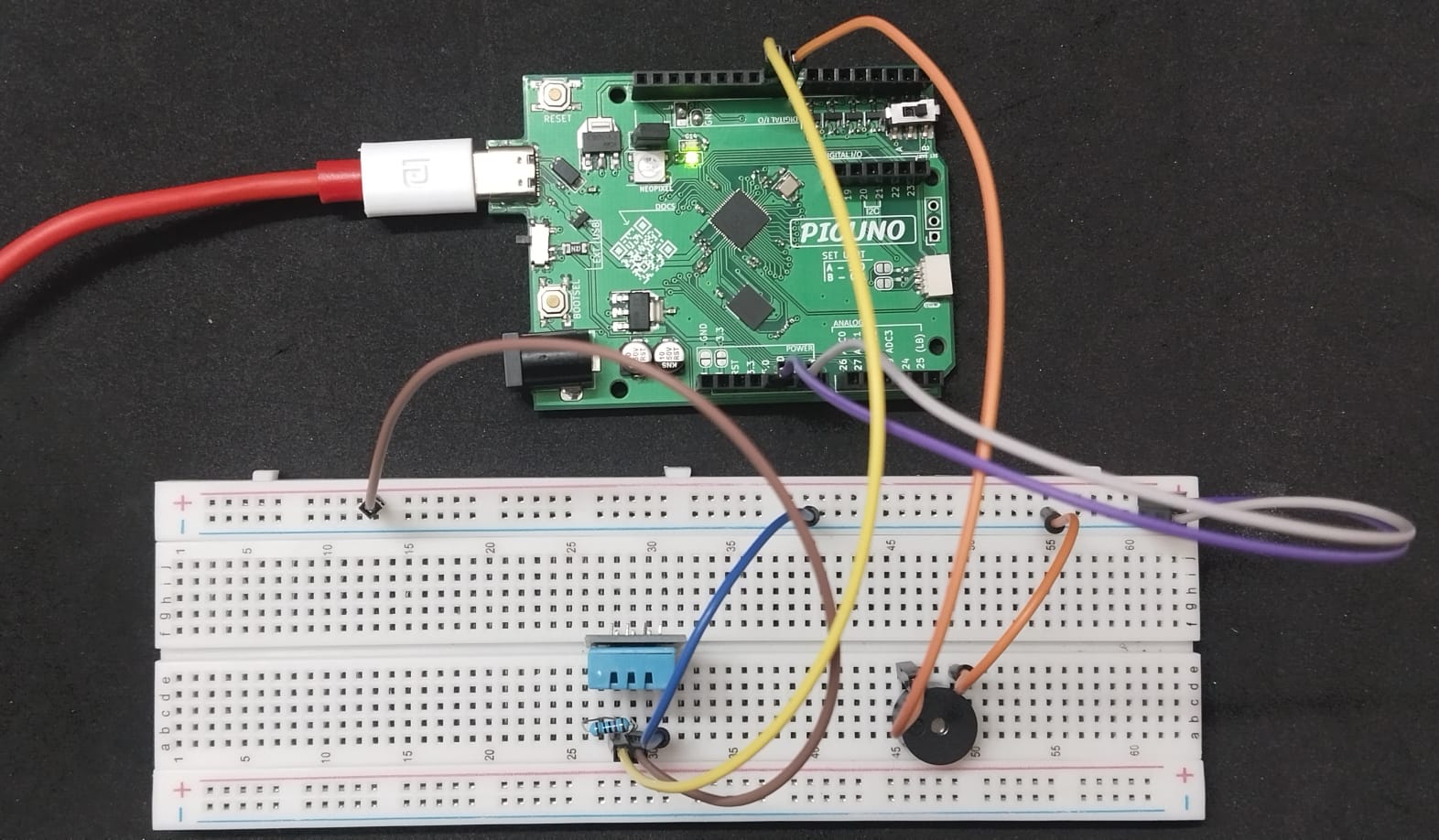
HARDWARE REQUIRED:
- PICUNO Microcontroller board
- 1 × DHT11 Temperature and Humidity sensor
- 1 × Buzzer
- 1 × 10kΩ resistor (for pull-up)
- Jumper wires
- USB cable
DESCRIPTION:
This project creates a dual-mode environmental alarm. It uses a DHT11 sensor to continuously monitor both ambient temperature and humidity. The system will trigger an audible buzzer if either the temperature rises above its preset threshold or if the humidity rises above its threshold. This demonstrates how to use multiple sensor values to create more complex decision-making logic.
LIBRARIES REQUIRED:
For C / Arduino IDE:
- DHT sensor library by Adafruit: Installed via the Arduino Library Manager.
- Adafruit Unified Sensor: Installed as a dependency along with the DHT library.
- dht.py: The custom library file saved to the PICUNO board.
- The code also uses the built-in machine and time modules.
CIRCUIT DIAGRAM:
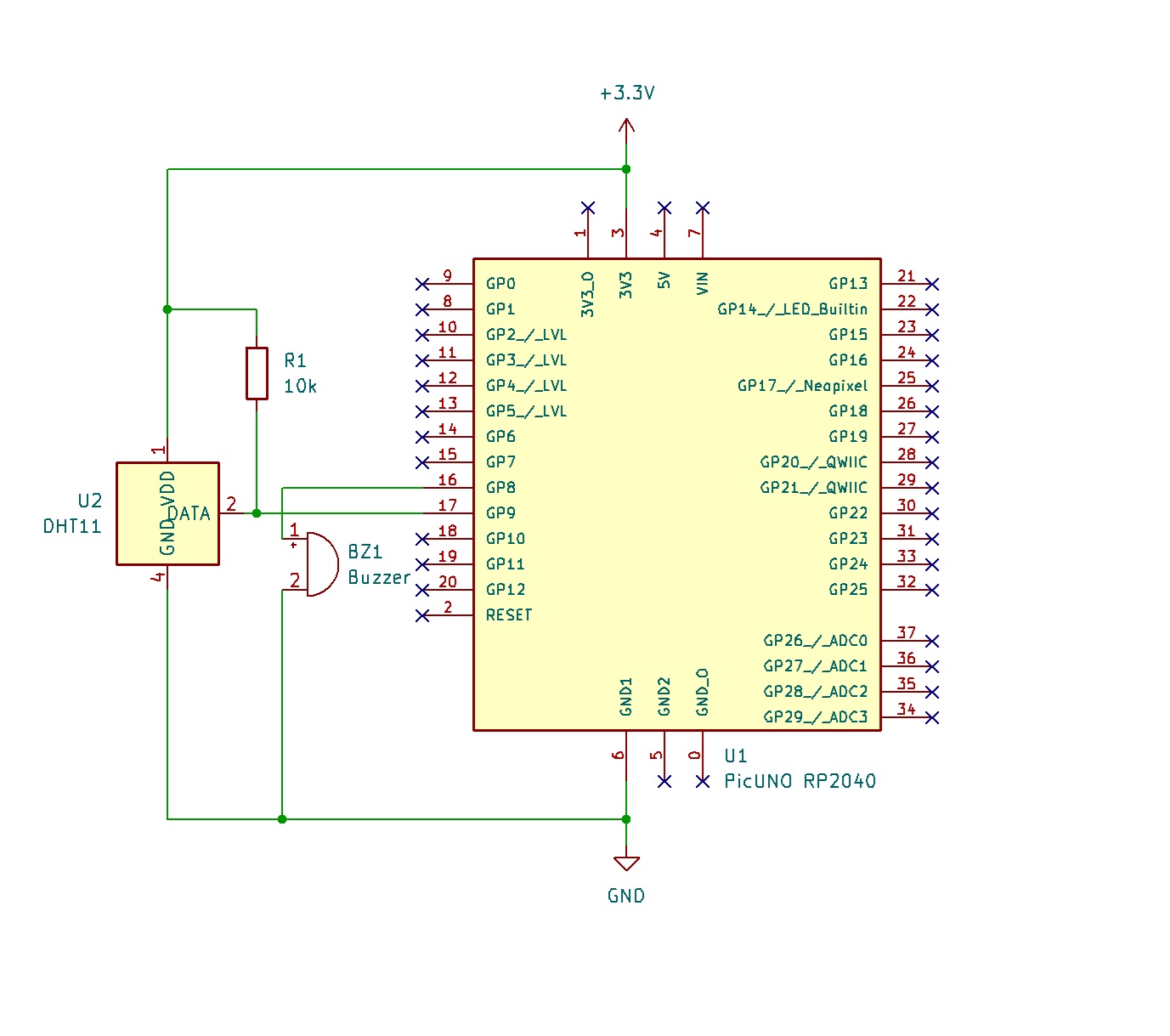
- Connect the PICUNO board to the computer using a USB cable.
- Connect the DHT11's VCC (or +) pin to 3.3V.
- Connect the DHT11's GND (or -) pin to GND.
- Connect the DHT11's DATA pin to GPIO 9.
- Connect the 10kΩ resistor between the DATA pin and the 3.3V pin.
- Connect the Active Buzzer's positive (+) leg to GPIO 8.
- Connect the Active Buzzer's negative (-) leg to GND.
SCHEMATIC:
DHT11 VCC (Centre pin) → 3.3V
DHT11 GND (Rightmost pin) → GND
DHT11 DATA (Leftmost pin) → GPIO 9
GPIO 9 → 10kΩ Resistor → 3.3V
Buzzer +ve terminal → GPIO 8
Buzzer -ve terminal → GND
CODE -- C:
#include "DHT.h"
#define DHTPIN 9
#define DHTTYPE DHT11
const int buzzerPin = 8;
const float TEMP_THRESHOLD = 35.0; // in Celsius
const float HUMIDITY_THRESHOLD = 85.0; // in Percent
DHT dht(DHTPIN, DHTTYPE);
void setup() {
Serial.begin(9600);
pinMode(buzzerPin, OUTPUT);
dht.begin();
}
void loop() {
delay(2000);
float h = dht.readHumidity();
float t = dht.readTemperature();
if (isnan(h) || isnan(t)) {
Serial.println("Failed to read from DHT sensor!");
return;
}
Serial.print("Humidity: "); Serial.print(h);
Serial.print("% Temperature: "); Serial.print(t); Serial.println("°C");
// Check if EITHER condition is met
if (t > TEMP_THRESHOLD || h > HUMIDITY_THRESHOLD) {
digitalWrite(buzzerPin, HIGH);
Serial.println("ALARM TRIGGERED!");
} else {
digitalWrite(buzzerPin, LOW);
}
}
#define DHTPIN 9
#define DHTTYPE DHT11
const int buzzerPin = 8;
const float TEMP_THRESHOLD = 35.0; // in Celsius
const float HUMIDITY_THRESHOLD = 85.0; // in Percent
DHT dht(DHTPIN, DHTTYPE);
void setup() {
Serial.begin(9600);
pinMode(buzzerPin, OUTPUT);
dht.begin();
}
void loop() {
delay(2000);
float h = dht.readHumidity();
float t = dht.readTemperature();
if (isnan(h) || isnan(t)) {
Serial.println("Failed to read from DHT sensor!");
return;
}
Serial.print("Humidity: "); Serial.print(h);
Serial.print("% Temperature: "); Serial.print(t); Serial.println("°C");
// Check if EITHER condition is met
if (t > TEMP_THRESHOLD || h > HUMIDITY_THRESHOLD) {
digitalWrite(buzzerPin, HIGH);
Serial.println("ALARM TRIGGERED!");
} else {
digitalWrite(buzzerPin, LOW);
}
}
const float TEMP_THRESHOLD, const float HUMIDITY_THRESHOLD - Defines the separate limits for temperature and humidity.
if (t > TEMP_THRESHOLD || h > HUMIDITY_THRESHOLD) - This is the core logic. The || symbol means OR. The alarm will sound if the temperature is too high OR if the humidity is too high.
digitalWrite(buzzerPin, HIGH); - Turns the buzzer on if either condition is true.
if (isnan(h) || isnan(t)) - Checks if the sensor reading was successful before using the value.
if (t > TEMP_THRESHOLD || h > HUMIDITY_THRESHOLD) - This is the core logic. The || symbol means OR. The alarm will sound if the temperature is too high OR if the humidity is too high.
digitalWrite(buzzerPin, HIGH); - Turns the buzzer on if either condition is true.
if (isnan(h) || isnan(t)) - Checks if the sensor reading was successful before using the value.
CODE -- PYTHON:
import machine
import dht
import time
d = dht.DHT11(machine.Pin(9))
buzzer = machine.Pin(8, machine.Pin.OUT)
# Define alarm thresholds
TEMP_THRESHOLD = 35.0 # in Celsius
HUMIDITY_THRESHOLD = 85.0 # in Percent
while True:
try:
time.sleep(2)
d.measure()
temp = d.temperature()
hum = d.humidity()
print(f"Temperature: {temp}°C, Humidity: {hum}%")
# Check if EITHER condition is met
if temp > TEMP_THRESHOLD or hum > HUMIDITY_THRESHOLD:
buzzer.value(1) # Turn buzzer ON
print("ALARM TRIGGERED!")
else:
buzzer.value(0) # Turn buzzer OFF
except OSError as e:
print("Failed to read sensor.")
import dht
import time
d = dht.DHT11(machine.Pin(9))
buzzer = machine.Pin(8, machine.Pin.OUT)
# Define alarm thresholds
TEMP_THRESHOLD = 35.0 # in Celsius
HUMIDITY_THRESHOLD = 85.0 # in Percent
while True:
try:
time.sleep(2)
d.measure()
temp = d.temperature()
hum = d.humidity()
print(f"Temperature: {temp}°C, Humidity: {hum}%")
# Check if EITHER condition is met
if temp > TEMP_THRESHOLD or hum > HUMIDITY_THRESHOLD:
buzzer.value(1) # Turn buzzer ON
print("ALARM TRIGGERED!")
else:
buzzer.value(0) # Turn buzzer OFF
except OSError as e:
print("Failed to read sensor.")
TEMP_THRESHOLD, HUMIDITY_THRESHOLD - Sets the separate trigger points for the alarm.
if temp > TEMP_THRESHOLD or hum > HUMIDITY_THRESHOLD: - This is the main logic. The or operator checks if at least one of the conditions is true.
buzzer.value(1) - Activates the buzzer if the temperature or the humidity has crossed its limit.
except OSError - Checks if the sensor reading was successful before using the value.
if temp > TEMP_THRESHOLD or hum > HUMIDITY_THRESHOLD: - This is the main logic. The or operator checks if at least one of the conditions is true.
buzzer.value(1) - Activates the buzzer if the temperature or the humidity has crossed its limit.
except OSError - Checks if the sensor reading was successful before using the value.